

QLeave is an important Queensland worker benefit scheme that helps eligible employees build portable long service leave while working within covered industries. The key difference from a traditional long service leave arrangement is that eligible workers can carry their recognised service with them when moving between employers in the same industry, rather than starting their service period again each time they change jobs.
For workers, students, apprentices, casual employees, contractors and employers in Queensland, knowing how QLeave operates can make it easier to keep employment records accurate and protect future leave entitlements. Depending on your role and industry, you may use QLeave for registration, checking eligibility, reviewing recorded service, submitting a leave claim, updating personal details, or completing employer-related requirements through QLeave Online Services.
This guide covers the main aspects of QLeave, including registration, eligibility, industries covered by the scheme, portable long service leave, claims, employer responsibilities, account management and common questions. Visit Homepage.
What Is QLeave?
QLeave is a statutory authority of the Queensland Government responsible for administering portable long service leave schemes for eligible workers in specific industries.
With a conventional long service leave arrangement, an employee generally needs to remain with the same employer for an extended period before qualifying for the relevant leave benefit. This can create difficulties in industries where workers regularly move between businesses. QLeave addresses this issue by recording eligible service so that qualifying employment can continue to count when a worker changes employers within the relevant industry.
As employment changes from one business to another, eligible service can remain connected to the worker’s QLeave membership. This allows recognised service to build over time towards a portable long service leave entitlement.
Key Purposes of QLeave
The main functions of QLeave include:
Who Should Use QLeave?
The QLeave system supports different types of workers and businesses throughout Queensland, depending on the industry and applicable eligibility requirements.
Workers
Eligible workers can use QLeave to manage and monitor their portable long service leave information. Depending on their circumstances, workers may be able to:
Keeping account information current is particularly useful because the scheme relies on accurate employment and service records.
Students
Students who work part-time or casually in a covered industry may also be eligible for QLeave benefits. A temporary or part-time job does not automatically mean that service cannot count. Where the employment meets the relevant scheme requirements, eligible service may contribute towards a future portable long service leave entitlement.
Apprentices and Trainees
Apprentices and trainees may work for different employers or across multiple projects while developing their skills. Where their employment is covered by the relevant QLeave scheme, their eligible service can continue to be recorded as they progress through their working career.
This portability is useful for workers whose employment changes during training or as they move between projects and businesses.
Employers
Employers operating in covered industries have responsibilities under the applicable QLeave scheme. Businesses may need to use QLeave services to:
Employers should ensure that worker information and service records are submitted correctly so eligible employees receive appropriate recognition for their service.
Industries Covered by QLeave
Whether a person can participate in QLeave depends largely on the industry in which they work and whether their employment meets the requirements of the applicable scheme. QLeave administers portable long service leave schemes covering several industries in Queensland.
Building and Construction Industry
The building and construction sector includes a broad range of occupations and workers involved in construction and related building activities.
Examples include:
Workers in this sector may move between employers and construction projects regularly. Portable service arrangements can therefore help ensure that eligible service remains recognised when employment changes within the covered industry.
Contract Cleaning Industry
The contract cleaning industry includes many workers who provide cleaning services under commercial or other cleaning arrangements. Eligible workers in this sector may be covered by QLeave, depending on the applicable requirements.
Examples include:
Cleaning contracts may change between businesses or sites, which can result in workers moving from one employer to another while continuing to perform work within the same industry. Portable long service leave can help preserve eligible service across those employment changes.
Community Services Industry
The community services industry covers a range of roles providing support, care, welfare and related community services. Workers in eligible roles may be able to accumulate portable service through QLeave.
Examples include:
Eligibility depends on the relevant employment and scheme requirements, so workers should check whether their specific role and employment arrangement are covered.
Why Portable Long Service Leave Matters
Changing employers is a normal part of working life, particularly in industries where employees move between projects, contracts, businesses or service providers. Under a traditional long service leave arrangement, leaving an employer before meeting the required service period can affect the employee’s ability to qualify for that employer-based entitlement.
The QLeave model is designed to deal with this issue by linking eligible service to the worker rather than relying solely on continuous service with one employer. When a worker changes employers within the relevant covered industry, recognised service can continue to be recorded, subject to the scheme’s eligibility requirements.
Benefits of Portable Long Service Leave
| Benefit | Description |
|---|---|
| Service Portability | Eligible service can continue to be recognised when a worker changes employers within the same covered industry. |
| Long-Term Protection | Workers can retain their recorded service history instead of losing it simply because they change employers. |
| Career Flexibility | Employees can move between eligible jobs without necessarily having to restart their service period from the beginning. |
| Centralised Records | Recognised service information is maintained through the worker’s QLeave membership and records. |
| Greater Security | Portable arrangements help protect eligible long service leave benefits as workers move through their careers. |
| Employer Reporting | Employer service returns help maintain records of eligible employment and service days. |
| Future Leave Access | Accumulated eligible service can contribute towards a future portable long service leave entitlement when the scheme’s requirements are met. |
The main advantage of the QLeave system is portability. Instead of treating every new employer as a completely new starting point, the scheme can preserve eligible service across qualifying employment changes, helping workers build towards long service leave over time.
QLeave Registration Process
Workers who are employed in an eligible industry should complete their QLeave registration as early as they can. Registering helps ensure that eligible service can be recorded under the portable long service leave scheme and reduces the risk of employment or service information being missing later.
The QLeave system has separate registration responsibilities for workers and employers, so each user should follow the process that applies to their role.
Worker Registration
Workers who begin employment in an eligible industry can register with QLeave so their eligible service history can be recorded.
Applicants may generally need to provide information such as:
After the registration has been processed, the worker receives a membership record that can be used as they continue working in covered industries throughout their career.
Employer Registration
Businesses that employ eligible workers also have registration responsibilities with QLeave.
Employer registration generally requires information such as:
Once the business registration is established, employers can use the relevant online services to report eligible worker service and meet their ongoing obligations.
Step-by-Step Guide to Register for QLeave
Step 1: Visit the QLeave Website
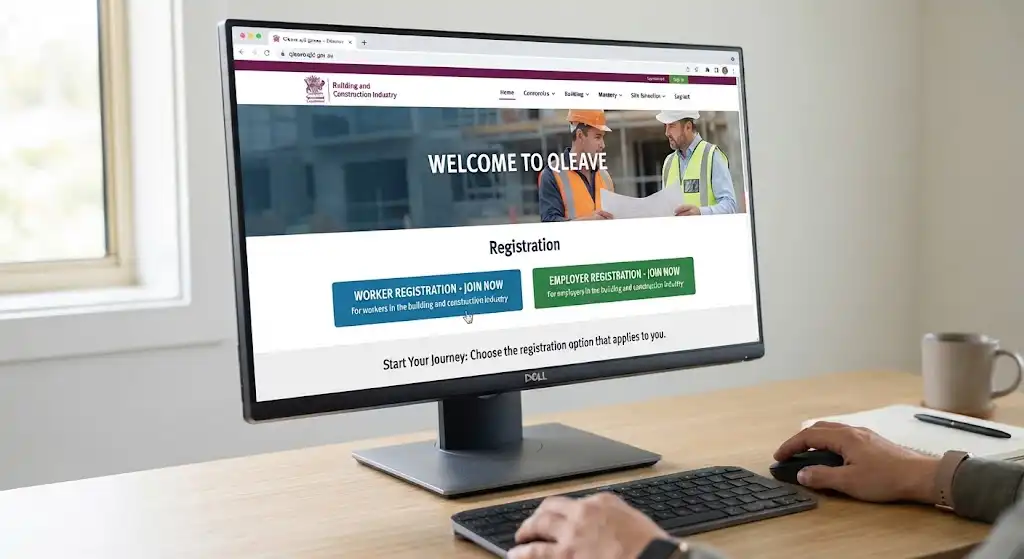
Start by going to the official QLeave website and locating the registration section.
Choose the registration option that applies to you. Workers and employers follow different pathways, so selecting the correct option at the beginning helps ensure that you are directed to the appropriate process.
Step 2: Choose the Appropriate Account Type

The registration system provides different pathways depending on the user’s role.
These may include:
Selecting the correct account category is important because it determines which registration process and forms are presented to you.
Step 3: Enter Your Personal or Business Information

Enter all requested information carefully and make sure the details match your employment or business records.
Workers should pay particular attention to their employment information, while employers should check their business, payroll and contact details before continuing.
Providing incorrect or incomplete information may cause delays in processing and can create problems when service information needs to be reported or reviewed later.
Step 4: Submit Registration Information
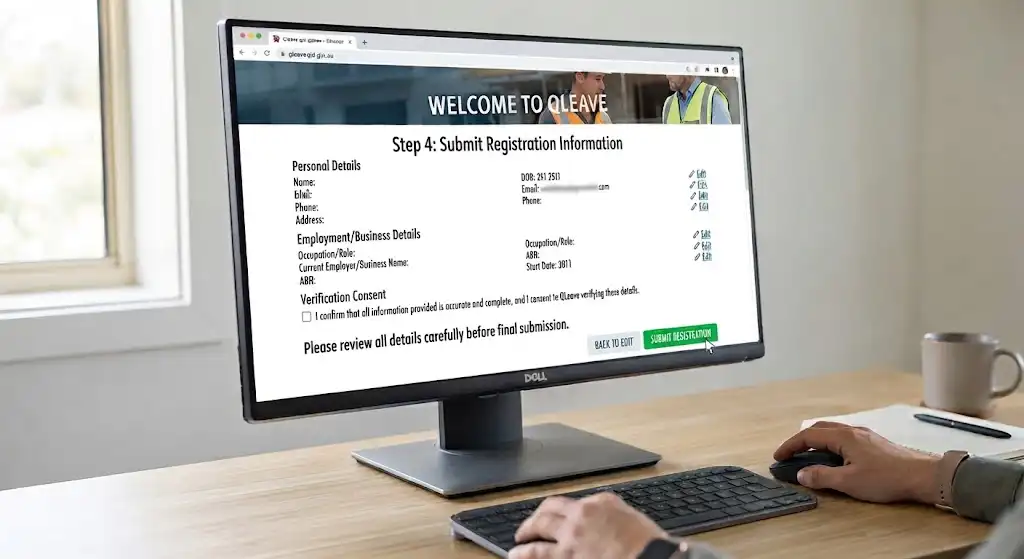
Before submitting the registration, review each section to make sure the information provided is accurate.
Once submitted, QLeave may need to verify the information before the account or registration is fully established.
Keep any confirmation email, registration reference or other confirmation information provided after submission. These details may be useful if you need to follow up on your registration.
Step 5: Access Your Online Services Account
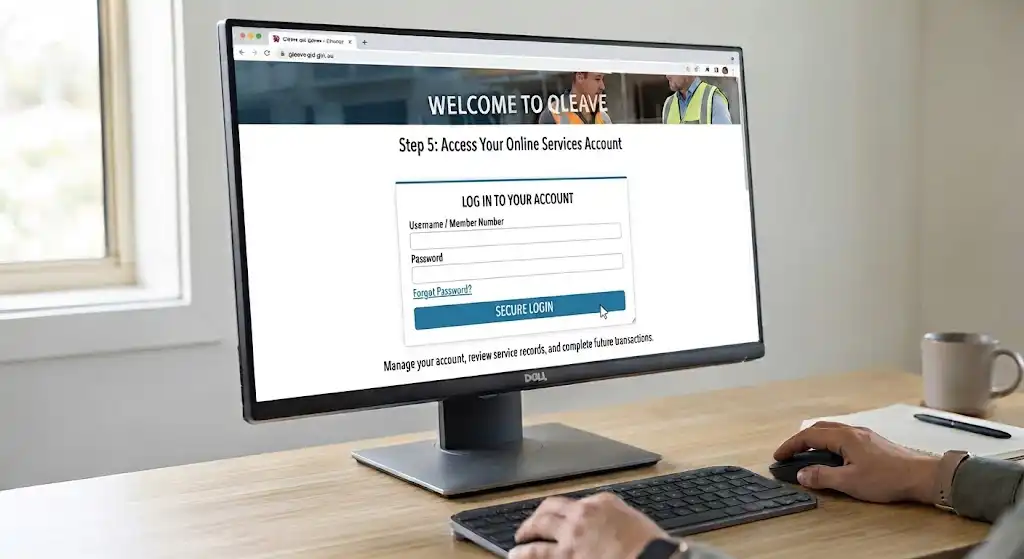
After the registration process has been completed, users can access their relevant QLeave Online Services account.
The online account can be used to manage account information, review service records and complete future transactions or activities associated with the user’s QLeave membership or employer responsibilities.
Understanding QLeave Service Credits
Service credits are a central part of the QLeave portable long service leave system. They represent eligible service that has been reported and recorded for a worker under the relevant scheme.
When employers report eligible work completed by registered workers, those records contribute to the worker’s service history. The accumulated records can then be used when determining future portable long service leave entitlements.
How Service Is Recorded
Employers provide service information for eligible workers through the applicable QLeave reporting process.
Depending on the relevant requirements, reported information may include:
Workers can subsequently review the service information recorded against their membership through their online account.
Accurate employer reporting is important because these records form part of the worker’s service history and may be relevant when a future leave entitlement is assessed.
Monitoring Your Service History
Workers should make a habit of checking their QLeave records from time to time rather than waiting until they are ready to claim long service leave.
Reviewing the account can help identify issues such as:
Finding an issue early can make it easier to investigate and request a correction. A problem discovered many years after the relevant employment period may be more difficult to resolve, particularly if supporting employment information is no longer readily available.
QLeave Long Service Leave Entitlements
The central purpose of QLeave is to provide eligible workers with access to portable long service leave. Workers build eligible service over time and may become entitled to leave after meeting the applicable service requirements.
Because the scheme is portable, eligible service can be recognised across qualifying employment rather than being limited to one employer.
How Leave Accumulates
Eligible service is progressively recorded through employer returns.
Instead of restarting the service period whenever a worker changes companies, recognised service can be combined across eligible employment within the same covered industry, subject to the requirements of the applicable scheme.
This arrangement allows eligible workers to continue building their portable long service leave service even when their employment moves between different businesses.
Vesting Requirements
Access to long service leave generally depends on meeting the prescribed accumulated service requirements under the relevant legislation.
In many cases, entitlement is commonly associated with approximately ten years of qualifying industry service. However, particular circumstances may allow a pro-rata entitlement after a shorter qualifying period where the applicable legislation provides for it.
Workers should therefore consider their individual service record and the rules that apply to their particular QLeave industry scheme when determining whether they qualify for a payment or period of leave.
Benefits of the System
The QLeave portable long service leave system can provide several important benefits to eligible workers:
The portable nature of the scheme is particularly useful in industries where workers regularly move between employers, contracts or projects.
Taking Long Service Leave Through QLeave
Once the relevant service requirements have been satisfied, an eligible worker may apply to access their accumulated long service leave benefits.
Before making a claim, it is sensible to review your account and make sure the information held by QLeave accurately reflects your employment and service history.
Before Submitting a Claim
Workers should check the following before submitting a leave application:
Checking these details beforehand can help reduce avoidable delays and give the worker an opportunity to identify any service-record issue before lodging the application.
Claim Preparation Checklist
Use this checklist when preparing for a QLeave leave claim:
✔ Verify personal details
✔ Review service records
✔ Confirm eligibility requirements
✔ Gather supporting information
✔ Check employer details
✔ Prepare leave dates
Taking a few minutes to review these items can make the application process more straightforward and help ensure that the information submitted is complete.
How to Submit a QLeave Leave Claim
The QLeave Online Services platform provides the online process for submitting a long service leave claim.
The exact information required can depend on the worker’s circumstances and the applicable scheme, but the general process involves accessing the account, opening the claims area, completing the required information and submitting the application for assessment.
Access Your Account
Sign in to your QLeave online account using your membership credentials.
Make sure you are using the account associated with your worker membership so that your service history and other relevant information can be accessed correctly.
Open the Claims Section
After signing in, locate the section for leave applications or claims within the online portal.
Follow the available instructions to begin the long service leave application process.
Complete the Claim Form
Enter the information requested by the application form.
Applicants may need to provide:
Review the information carefully before continuing. The details supplied should be consistent with the worker’s QLeave membership and employment records.
Submit the Application
Once the claim information has been checked, submit the completed application through the relevant online service.
Keep any confirmation or reference information provided after submission so that you have a record of the application.
Await Assessment
After submission, QLeave assesses the application and checks the relevant eligibility requirements before a claim can be approved.
The assessment process may involve verifying the information supplied in the application against the available membership and service records. Workers should monitor their account or any communications from QLeave for updates relating to their application.
QLeave Payments and Leave Benefits
Once a long service leave claim has been approved, QLeave arranges the applicable payment in accordance with the rules of the relevant scheme and the worker’s individual circumstances. The payment process is intended to provide eligible workers with the leave benefits they have built up through their recognised service.
How QLeave Payments Are Calculated
Long service leave payments are generally determined using information about the worker’s ordinary earnings and employment history recorded under the applicable scheme.
Factors that may be considered when calculating a payment include:
Payment amounts are not necessarily the same for every worker because earnings, employment arrangements, service history and other circumstances can differ.
How Payments Are Made
Depending on the worker’s circumstances and the requirements of the applicable QLeave scheme, an approved leave payment may be:
Workers should also make sure their banking information and personal details are current where applicable. Keeping these details accurate can help reduce the possibility of delays when a payment needs to be processed.
Employer Responsibilities Under QLeave
Employers in industries covered by QLeave have specific responsibilities under the portable long service leave system.
Meeting these obligations is important because accurate employer reporting helps protect eligible workers’ service records and supports compliance with the relevant Queensland legislation.
Register Eligible Workers
Businesses should identify workers whose employment falls within a covered industry and make sure eligible workers are properly recorded through the QLeave system.
Correct registration is important because worker service needs to be associated with the appropriate membership and employment records.
Submit Service Returns
Employers are generally required to provide service returns containing information about eligible workers and their periods of service.
These returns allow QLeave to maintain worker service records and use the reported information when determining future portable long service leave entitlements.
Pay Required Levies
Depending on the industry and applicable scheme requirements, employers may be required to pay levies that help fund and operate the portable long service leave scheme.
Employers should understand which levy requirements apply to their business and ensure payments are handled as required.
Maintain Accurate Records
Reliable record-keeping is an important part of meeting QLeave obligations.
Employers should retain relevant information such as:
Keeping these records organised can make it easier to investigate and resolve reporting questions if an issue is identified later.
Checking Your QLeave Status Online
The QLeave Online Services portal gives workers and employers access to important account and service information. Online access makes it easier to review records and identify potential issues without waiting until a leave claim is required.
Information Workers Can View
Workers can generally use their online account to access information such as:
Regularly checking these records is a useful way to identify missing or incorrect service information at an early stage.
Information Employers Can Access
Employers can use the relevant online services for tasks such as:
Using the online portal helps employers manage their QLeave responsibilities and keep relevant business and worker information organised.
Updating Your QLeave Information
Keeping QLeave account information up to date is important for accurate service records and reliable communication.
Workers should update their details whenever a relevant change occurs rather than waiting until they need to make a claim.
Details That Should Be Updated
Workers should notify QLeave when changes occur to information such as:
Current information helps ensure that correspondence, account records and future claims can be handled using the correct details.
Common Issues and Troubleshooting
Missing Service Days
A worker may sometimes find that a period of employment is not showing correctly in their QLeave account.
Possible causes can include:
If service appears to be missing, workers should compare their account with their employment records and contact QLeave when a discrepancy is identified. Keeping supporting employment information can be useful when investigating a missing service period.
Login Difficulties
If you are unable to access your QLeave account, work through the following checks:
- Check your username and password.
- Use the password recovery option.
- Verify your registered email address.
- Contact QLeave support if access issues continue.
Checking the basic account information first can help identify whether the problem is related to login credentials or registered account details.
Incorrect Personal Information
Incorrect personal details can create problems with account communication, service records or future claims.
If you notice that information in your account is inaccurate, update the relevant details as soon as possible so that your QLeave records remain current.
Benefits of Using QLeave
The QLeave scheme can provide important advantages for eligible workers while also giving employers a structured system for managing portable long service leave responsibilities.
For Workers
Eligible workers can benefit from:
The portability of service is particularly useful for workers who regularly move between businesses within a covered industry.
For Employers
Employers can benefit from:
Maintaining accurate records and using the online system appropriately can also make it easier for employers to manage ongoing reporting responsibilities.
Frequently Asked Questions
Final Thoughts
For eligible workers and employers across Queensland, QLeave provides a way to manage portable long service leave while allowing recognised service to remain connected to workers as they move between employers within covered industries. This can be particularly valuable for students beginning eligible employment, tradespeople moving between construction projects, community services workers and other employees whose careers involve changes of employer. For More Information Visit Our Homepage.
Keeping your QLeave registration, personal information and employment records accurate is an important part of protecting future entitlements. Workers should regularly review their service history, while employers should maintain accurate records, submit required returns and meet applicable levy and reporting responsibilities. Taking these steps can help ensure that eligible long service leave benefits remain properly recorded and available when the relevant requirements are met.
READ MORE:
OnGuard v3 Login 2026: Student Access, Training, Assessments & Safety Modules
OneSchool Queensland (2026): Student Access, Parent Services and School Information
Goodstart Intranet 2026: Staff Login, Employee Tools & Services
CSU Student Portal (2026): Complete Guide to Login, Study Tools, Records & Support