
ATO Portal provides a secure online way to access important Australian Taxation Office services through myGov. Users can manage tax information, check income details, view superannuation information, update personal details and complete other routine tax tasks without visiting an ATO office.
This guide explains how the ATO Portal works for Australian residents, students, employees, working holiday makers and foreign residents. It covers ATO Portal login, myGov linking, TFN services, tax return preparation, superannuation information and other essential online services in a simple, step-by-step format. Visit Homepage
What Is the ATO Portal?
The ATO portal is the online access point used to manage personal tax and related information with the Australian Taxation Office. For individuals, access is provided through a linked myGov account rather than through a separate personal ATO username and password.
Once access has been established, users can view tax records, manage personal details, check income information, review superannuation and complete eligible tax tasks online. The system is particularly useful for people who want to handle routine tax responsibilities without relying on paper forms.
Who Can Use Online ATO Services?
The service is relevant to a wide range of taxpayers, including:
The exact services available to you depend on your circumstances and the information held by the ATO.
What You Need Before Getting Started
Before accessing the ATO portal, you need an active myGov account and a way to verify your identity when linking the Australian Taxation Office service.
Your preparation should include:
If you have limited Australian tax records, the normal online identity checks may not provide enough information to complete the connection. In that situation, an ATO linking code may be required.
How to Create a myGov Account
The first stage is creating your myGov account if you do not already have one.
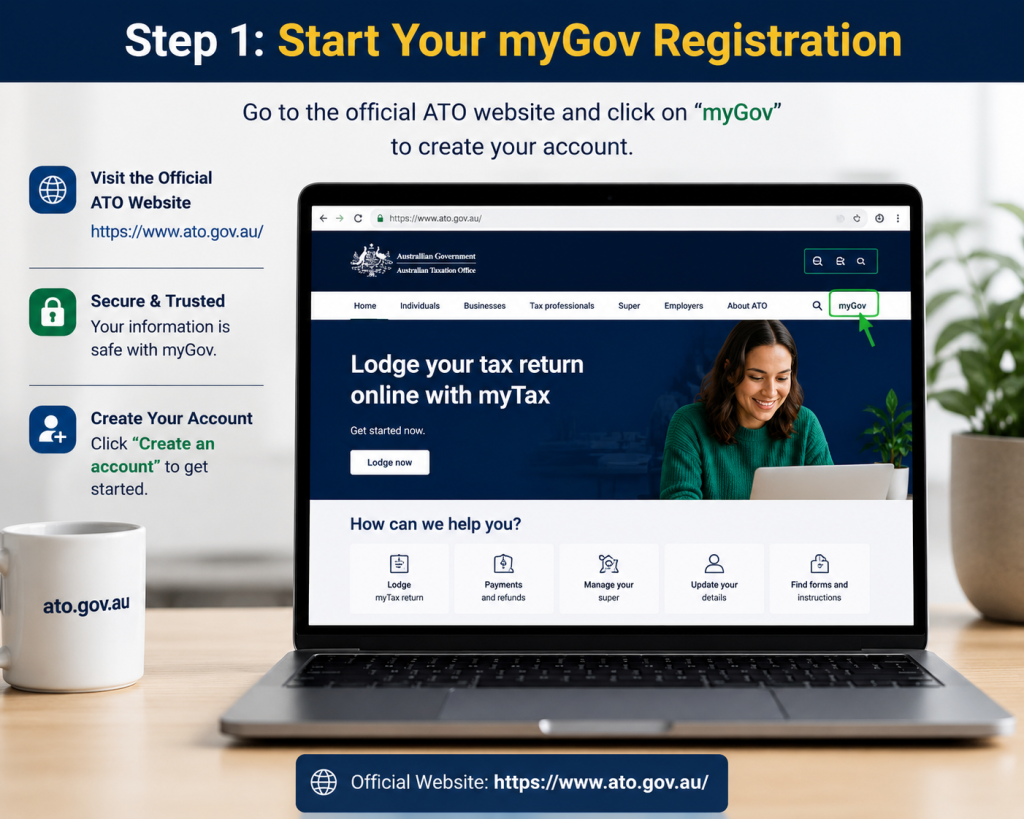
Step 1: Start Your myGov Registration

Open the official myGov website and select the option to create a new account. You will need to agree to the applicable terms and provide an email address that you can access.
Step 2: Confirm Your Email
A security code is sent to the email address you provide. Enter that code when requested to verify that the email belongs to you.
Step 3: Set Up Account Security

Follow the prompts to establish your sign-in security. Depending on the available options, this can include SMS verification or an approved digital identity application.
Keep your sign-in details private and avoid sharing verification codes with anyone. These credentials provide access to sensitive personal and financial information.
How to Link the ATO to myGov
After creating your myGov account, the next task is connecting it with the Australian Taxation Office.
Step 1: Sign In to myGov
Log in to your myGov account and open the section for viewing and linking government services.
Step 2: Select the Australian Taxation Office
Find the Australian Taxation Office in the available services and select it to begin the linking process.
Step 3: Complete Identity Verification
You may be asked for your Tax File Number and information that matches records already held by the ATO. Depending on your circumstances, this can include details such as bank account information, superannuation information or information from a payslip.
If you cannot provide enough information for the standard verification process, you may need to contact the ATO and request a unique linking code.
Step 4: Open Your Online Tax Services
After the connection has been completed, the Australian Taxation Office service will appear within your myGov account. Selecting it takes you into your available online tax services.
Understanding the ATO Portal Dashboard
The ATO portal dashboard is designed to bring common tax tasks into one place. The information displayed can vary according to your personal circumstances, but several areas are especially useful.
Home and Personal Messages
The home area can show alerts, reminders, outstanding tasks and information requiring your attention. Checking this area regularly can help you avoid missing a lodgment or payment requirement.
Tax Information
The tax section provides access to relevant tax records and transactions. Depending on your circumstances, you may be able to review previous returns, outstanding obligations, account transactions and payment information.
Superannuation
The superannuation area allows eligible users to review information about their super accounts. It can help you identify super held across different funds and check information relating to contributions.
My Profile
Your profile area is used for personal information such as contact details, address information and bank account details. Keeping these records current is important, particularly when you are expecting a tax refund.
Key Services Available Online
Once your access is established, several important tasks can be handled digitally. The most common include:
| Service | Main purpose |
|---|---|
| Tax returns | Prepare and lodge eligible individual returns |
| Income information | Review income reported by employers |
| TFN records | Manage or retrieve relevant TFN information |
| Superannuation | Review available super account information |
| Tax account | Check balances and transactions |
| Personal details | Update contact and banking information |
The online system can save time because much of the information needed for a tax return may already be available electronically.
What Comes Next?
The most important task for many individual taxpayers is lodging an annual return through myTax. Before starting, it is worth checking that your personal details, bank information and income records are accurate.
The next section explains the tax-return process, including the financial year, preparation of income and deductions, calculation of your result, and final submission.
How to Lodge a Tax Return Through myTax
For many individuals, the main reason to access the ATO portal is to prepare and submit an annual tax return. The Australian income year runs from 1 July to 30 June, and individuals who need to lodge their own return generally have until 31 October to do so.
Before starting, gather your income information, deduction records, relevant statements and other documents that support the figures you intend to report. Some information is automatically pre-filled, including employment income and bank interest, but you should still check every pre-filled amount and add anything missing.
Step 1: Open myTax
After signing in and opening your Australian Taxation Office services, select the option to prepare or lodge your return for the relevant income year. myTax guides you through the return according to the information and circumstances you select.
Step 2: Check Your Personal Information
Review your contact details and banking information before moving forward. If your bank details are incorrect, a refund could be affected, so make sure the information shown is current.
You may also be asked questions about your circumstances, including your residency status and other factors that determine which sections of the return apply to you.
Step 3: Personalise the Return
The personalisation stage helps determine which income and deduction sections you need to complete. Select the categories that match your circumstances rather than adding sections that do not apply.
Possible income categories can include:
The exact categories shown can vary from one taxpayer to another.
Step 4: Review Pre-Filled Information
The ATO can pre-fill information it has already received from employers, financial institutions and other reporting organisations. Employment information is generally available after the employer has finalised the income statement, with much of the information available by the end of July.
Do not assume that pre-filled information is automatically complete. Compare it with your own records and make corrections or additions where necessary.
Step 5: Add Deductions
If you are claiming eligible deductions, enter the relevant expenses and retain evidence such as receipts or statements. Common work-related expenses may include certain employment, self-education or home-working costs, but eligibility depends on the circumstances and the tax rules applying to that expense.
A deduction should not be claimed simply because an expense was connected to work. Check that it meets the applicable requirements before including it.
Step 6: Review the Tax Result
After the required information has been entered, myTax calculates an estimate based on the information provided. The result may indicate that you are due a refund or have an amount to pay.
Treat the estimate as a review point rather than assuming it is final. Check the figures carefully, especially income, deductions and tax already withheld.
Step 7: Declare and Submit
Read the declaration carefully and confirm that the information supplied is accurate and complete. Once you are satisfied with the return, submit it electronically.
Keep your supporting records after lodgment in case you need them later. The ATO also provides free Tax Help for eligible people with relatively straightforward tax affairs during the tax-time period.
What Students and Foreign Residents Should Know
Students, temporary visa holders and people who have moved between countries may need to pay particular attention to their Australian tax residency. Your immigration status and your tax residency are not necessarily the same thing.
The ATO assesses tax residency using relevant residency tests and circumstances rather than relying only on your citizenship or visa.
Australian Tax Resident
An Australian resident for tax purposes can generally access the tax-free threshold and is generally required to declare worldwide income, subject to the applicable rules. The tax treatment can also depend on whether your residency changed during the financial year.
If you arrived in Australia or changed your circumstances during the year, use the ATO’s residency guidance before completing the relevant questions in your return.
Foreign Resident for Tax Purposes
Foreign residents are treated differently from Australian residents. A foreign resident generally does not receive the tax-free threshold and is taxed under the rates that apply to foreign residents.
Foreign residents generally need to declare Australian income, while other aspects of their tax obligations depend on their circumstances. Working holiday makers can also have separate tax treatment from other foreign residents.
International Students
Being an international student does not by itself determine whether you are an Australian resident for tax purposes. Your individual circumstances matter, so check your residency position before completing the return.
If you worked during your studies, review your income statement and make sure the employment information shown online matches your own records.
Checking Income Statements
Income statements are particularly useful for employees and students who have worked in Australia during the financial year. Employers report employment information electronically, and eligible records can appear in your online services.
Why Income Statements Matter
Your income statement can show information such as employment income and tax withheld. Before lodging, check whether the statement has been finalised and whether the figures correspond with your employment records.
The ATO recommends waiting until relevant information is tax ready where possible because employer-reported amounts can change before finalisation.
If something appears incorrect or missing, contact the payer or employer responsible for the information rather than simply entering an unsupported figure.
Managing Superannuation Online
The ATO portal can also provide access to available superannuation information. This can be useful if you have changed employers, worked for several organisations or want to check whether super accounts are recorded against your details.
Finding Super Information
Review the superannuation information available in your online services and compare it with records supplied by your super funds or employers. If accounts appear to be missing or information looks incorrect, investigate the relevant fund records before making decisions about consolidation.
Superannuation rules can be complex, particularly when you leave Australia, so temporary visa holders should check the specific eligibility requirements before applying for a payment.
Departing Australia Superannuation Payment
Some temporary residents may be able to claim their superannuation after leaving Australia through the Departing Australia Superannuation Payment (DASP) system.
Eligibility depends on factors including your visa status, whether you have left Australia and whether the relevant visa has ceased. The tax treatment of the payment can also depend on the visa you held.
Do not assume that every international student or temporary worker automatically qualifies. Check the eligibility requirements that apply to your circumstances before submitting an application.
Common Problems With Online Tax Services
Occasionally, users may encounter difficulties while trying to access their account or complete a tax task. The right response depends on where the problem occurs.
myGov Access Problems
If you cannot sign in to myGov, use its account recovery and sign-in assistance rather than repeatedly entering incorrect credentials. Account security measures can temporarily restrict access after unsuccessful attempts.
Problems Linking the ATO
If your identity information does not match the records required for online linking, you may need another verification method. People who cannot complete the standard process may need to contact the ATO for assistance with a linking code.
Missing Income Information
Do not automatically assume that missing pre-filled information means the income does not need to be reported. Check your own records and, where appropriate, contact the organisation that should have supplied the information.
Incorrect Pre-Filled Details
Pre-filled data should be reviewed before submission. If an employer or another payer has supplied incorrect information, contact the payer so the record can be corrected rather than simply relying on an inaccurate entry.
Important Tax-Time Checklist
Before submitting your return, check these points:
A careful final review can prevent simple reporting errors and reduce the chance of needing to correct information later.
How to Keep Your ATO Online Access Secure
Because online tax services contain sensitive financial and identity information, account security should be treated as a priority. The ATO recommends using stronger security options for online services where they are available, including myID and additional security through the ATO app.
Protect Your Sign-In Details
Never give your myGov password, security codes or authentication details to another person. Use a unique password and keep your recovery information up to date so that you can regain access if you lose your normal sign-in method.
You should also be cautious about unexpected messages asking you to provide personal information. When accessing tax services, use the official Australian Government websites rather than following suspicious links received by email or text.
Use Stronger Digital Identity Security
The ATO currently recommends a three-stage approach for stronger online security: strengthen your myID, use it when accessing or linking to online services where applicable, and consider using the ATO app with push notifications.
Security requirements can depend on the identity method previously used. For example, if you have previously accessed ATO online services with a particular myID identity strength, you may need to use the same or a higher strength when linking again.
What to Do When Linking Does Not Work
A failed connection between myGov and the ATO does not always mean that your account is incorrect. Small differences between the information entered and the details held in ATO records can cause verification problems.
Check Your Personal Information
Make sure your Tax File Number is entered as a nine-digit number without spaces. Your name should also match the format held in the ATO record. The ATO specifically provides guidance for situations where names or other identity details do not match.
If your address, date of birth, spelling or other identifying information differs between records, this can also prevent successful verification.
Previous myID Users
People who have previously used myID to access ATO online services can encounter a different linking requirement. For security reasons, the system can require the same identity strength, or a higher one, that was previously established.
If you see an error connected with this requirement, follow the ATO’s instructions for signing out and returning through the appropriate myID option instead of repeatedly attempting the same verification method.
When You Cannot Access Your Account
There are two separate issues to consider: problems with myGov itself and problems occurring after you have entered the ATO service.
If You Cannot Sign In to myGov
Use myGov’s account recovery or sign-in assistance when the problem occurs before you reach your linked government services. Avoid creating another account simply because you have temporarily lost access to the original one.
If you believe another person has accessed your myGov account or linked ATO services without permission, contact the ATO promptly. The ATO lists 13 28 61 for individual enquiries involving these types of tax-account security concerns.
If the ATO Service Is Not Working
If myGov opens normally but a particular tax service fails, check the ATO’s online-services support information. The ATO provides assistance for problems involving linking, myTax, the ATO app and online TFN applications.
Before contacting support, note the exact error message or code displayed on your screen. This can make it easier to identify the problem.
ATO Contact Options
When online troubleshooting does not resolve an issue, contacting the ATO may be necessary.
Calling From Australia
For individual enquiries involving myTax, tax returns, TFNs, progress of returns and myGov linking, the ATO lists 13 28 61. Its published individual enquiry hours are 8:00 am to 6:00 pm, Monday to Friday.
Calling From Overseas
People contacting the ATO from outside Australia can use +61 2 6216 1111 for the relevant individual enquiry service. The published hours are 8:00 am to 5:00 pm AEST, Monday to Friday.
Getting Language Assistance
If you need interpreting assistance, the ATO provides information about accessing language support. The published information also lists the Translating and Interpreting Service through 13 14 50.
Always check the current contact information before calling, particularly if you are contacting the ATO from overseas or outside normal Australian business hours.
Common ATO Portal Questions
Final Takeaway
The ATO portal provides individuals with a central online route for managing tax and superannuation matters through linked government services. Once access is established, taxpayers can review records, prepare returns, check income information, manage relevant personal details and access available superannuation information.
The safest approach is to keep your information accurate, review pre-filled data carefully, protect your sign-in credentials and use official ATO support when an online problem cannot be resolved. For the latest service requirements, security options and contact information, refer to the Australian Taxation Office’s official website.
Tax Agent Portal Login (2026): Complete Guide to ATO Online Services for Agents
ATO Business Portal Login Guide (2026): Complete Guide to Online Services for Business
Storypark (2026)Australia: Complete Guide to Login, Setup, Learning Stories & Family Communication