

Australian Passport Online Application Portal is the official digital platform that allows Australian citizens to apply for a new passport, renew an existing passport, and track the progress of their passport application online. As more government services move online, the Australian Passport Online Application Portal has become the fastest and most convenient way to manage passport-related services without lengthy paperwork.
Whether you are applying for your first passport, replacing a lost or stolen passport, or renewing an expired document, the Australian Passport Online Application Portal simplifies the entire process. Through the portal, applicants can complete forms, upload required information, book appointments when necessary, and stay updated on their application status. This complete 2026 guide explains everything you need to know about using the Australian Passport Online Application Portal, including eligibility requirements, application steps, renewal procedures, fees, processing times, and tracking options. Visit Homepage
What Is the Australian Passport Online Application Portal?
The Australian Passport Online Application Portal, commonly known as AusPassport, is the official digital platform used by Australian citizens to prepare passport applications online before lodging them in person. Managed by the Australian Passport Office (APO), which operates under the Department of Foreign Affairs and Trade (DFAT), the portal allows applicants to complete passport forms, save progress securely, print official documents, and monitor application status after submission.
Whether you are applying for your first Australian passport, renewing an existing passport, replacing a lost document, or applying on behalf of a child, the Australian Passport Online Application Portal provides a streamlined way to begin the process.
A major advantage of the system is that applicants can complete most administrative steps online before attending an authorised lodgement location.
Key Functions Available Through AusPassport
The Australian Passport Online Application Portal supports several passport-related services for eligible Australian citizens.
Services You Can Access
Main Portal Features
| Feature | Description |
|---|---|
| Online Applications | Complete passport forms digitally |
| Secure Login | MFA protection through passkey or verification code |
| Auto-Save Function | Saves progress for up to 14 days |
| Printable Forms | Generates official PDF forms |
| Status Tracking | Monitor application progress after lodgement |
| Child Applications | Supports parent and guardian submissions |
Who Can Use the Australian Passport Online Application Portal?
Not everyone living in Australia can obtain an Australian passport. Eligibility depends primarily on citizenship status.
Eligible Applicants
The portal is available to:
Applicants Who Are Not Eligible
The following individuals cannot apply for an Australian passport through the Australian Passport Online Application Portal:
These individuals must use the passport services provided by their own country of nationality.
Technical Requirements Before Starting
Before accessing the Australian Passport Online Application Portal, make sure you have the necessary equipment and information available.
System Requirements
| Requirement | Details |
|---|---|
| Browser | Latest Chrome, Firefox, Edge, or Safari |
| Internet Connection | Stable connection recommended |
| Email Address | Required for account verification |
| Mobile Number | Needed for authentication |
| PDF Reader | Required to open downloaded forms |
| Printer | Must support A4 paper printing |
Important Preparation Tips
Before beginning your passport application:
Creating an AusPassport Account
A secure account is required before using the Australian Passport Online Application Portal.
Step 1: Open the Portal
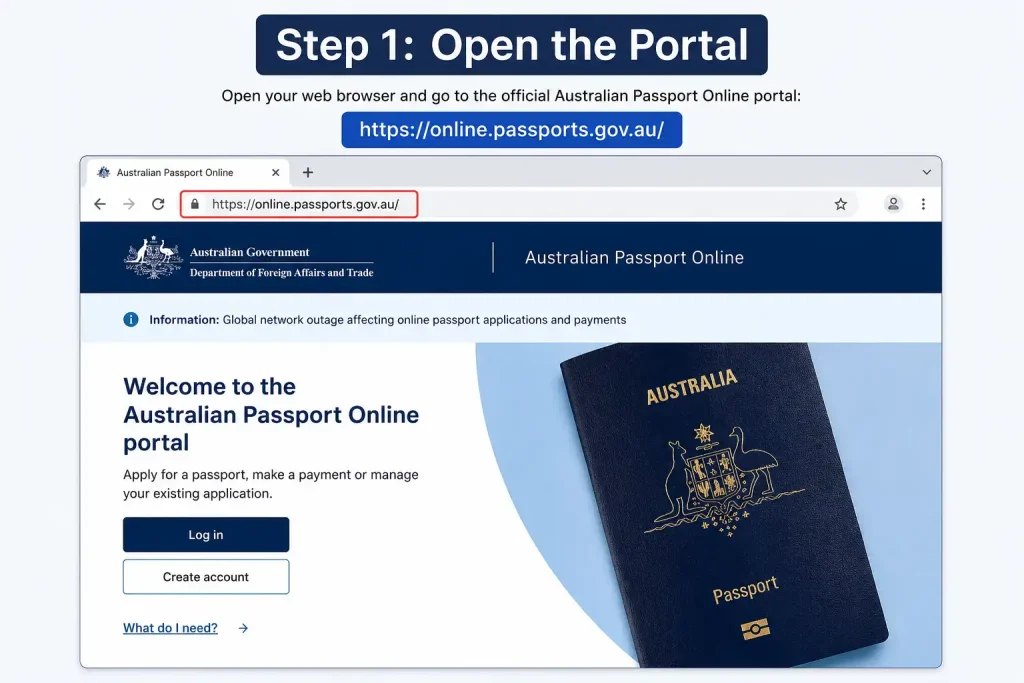
Visit the official Australian Passport Online Application Portal and select the account creation option.
Step 2: Enter Personal Information
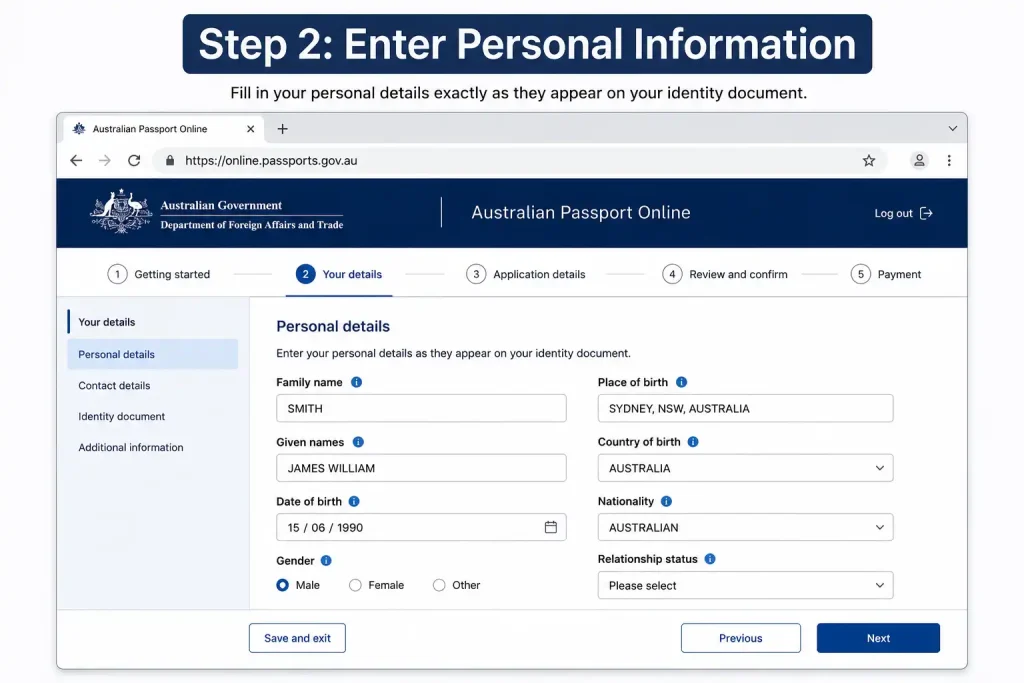
Provide:
Make sure the details match your official records.
Step 3: Configure Security Verification

The portal requires Multi-Factor Authentication (MFA).
You can choose:
Passkey Authentication
Passkeys may use:
Verification Codes
Codes can be delivered through:
Step 4: Verify Your Account
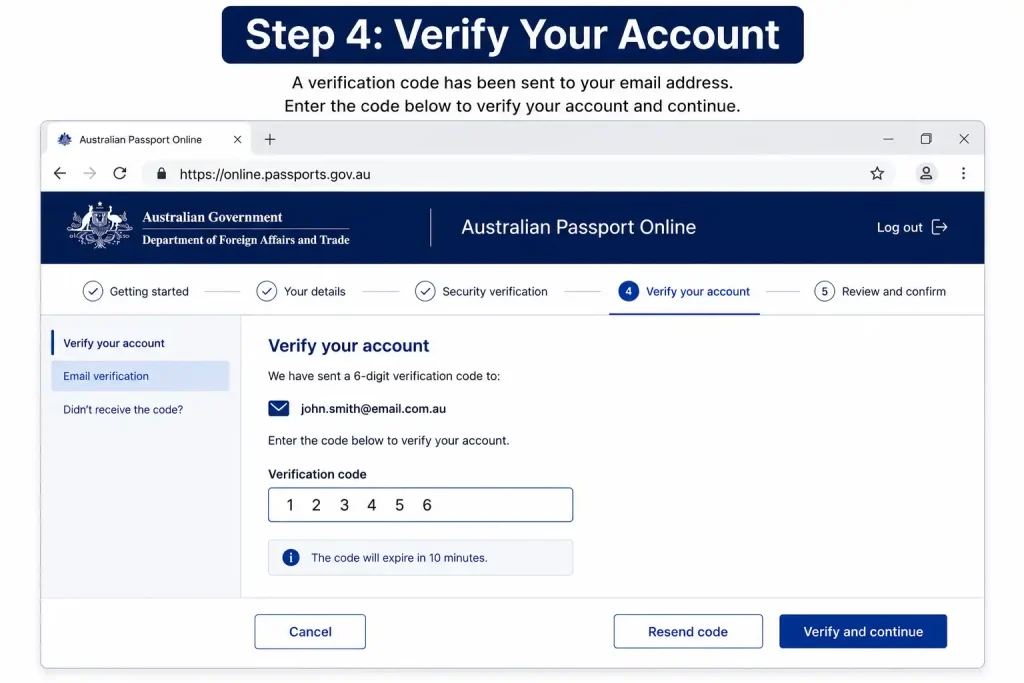
Complete the verification process using the code or passkey method selected during registration.
Once verified, your account becomes active and ready for passport applications.
Understanding Passport Application Categories
Different application types require different supporting documents and procedures.
Adult Passport Renewal
This category generally applies when:
First-Time Adult Application
Applicants who have never held an Australian passport or who do not meet renewal requirements generally fall into this category.
Child Passport Application
Applications for individuals under 18 years of age must be completed by a parent or legal guardian.
Lost, Stolen or Damaged Passport Replacement
Citizens whose passports are no longer usable can apply for replacement documentation through the appropriate application pathway.
Beginning Your Passport Application
Once logged into the Australian Passport Online Application Portal, select the appropriate passport category and begin entering your details.
Important Time Limit
Draft passport applications remain available for only 14 days.
Applications not submitted within this period are automatically removed from the system and must be started again.
Providing Personal Information
The next stage involves entering identity and citizenship information.
Details Commonly Requested
Accuracy is essential because inconsistencies may cause processing delays.
Citizenship Information
Applicants may be required to provide details from:
Referee and Guarantor Requirements
Some passport categories require an additional person to verify identity.
Referee Requirements for Adult Applications
First-time adult applicants generally need a referee.
Information typically required includes:
Referees should be available if contacted during processing.
Referee and Guarantor Requirements
Some passport categories require an additional person to verify identity.
Referee Requirements for Adult Applications
First-time adult applicants generally need a referee.
Information typically required includes:
Referees should be available if contacted during processing.
Guarantor Requirements for Child Applications
Child passport applications usually require a guarantor.
The guarantor is responsible for:
Choosing a suitable guarantor before starting the application can help avoid delays later in the process.
Reviewing and Printing the Application Form
After all online sections have been completed, carefully review the information before submission.
What to Check Before Printing
Confirm that:
Small errors may require a new application, so reviewing every section is worthwhile.
Printing Requirements
The generated passport application must be printed correctly for lodgement.
Use the following settings:
| Setting | Requirement |
|---|---|
| Paper Size | A4 |
| Orientation | Portrait |
| Print Quality | Clear and readable |
| Scaling | Fit to printable area |
| Ink | Black text clearly visible |
Always check that barcodes and signature sections appear fully on the printed pages.
Passport Photo Requirements
Passport photos are one of the most common reasons applications require correction.
Photo Specifications
Applicants must generally provide:
Digital uploads are not accepted through the Australian Passport Online Application Portal.
Physical photographs must be presented during lodgement.
Identity Documents Required
Different passport categories require different supporting documents.
Adult Renewal Applications
Applicants generally provide:
First-Time Adult Applications
Applicants commonly need:
Child Applications
Common requirements include:
Understanding Identification Categories
The Australian Passport Office may request identity evidence from multiple categories.
Category A Documents
Examples include:
Category B Documents
Examples include:
Category C Documents
Examples include:
These documents help verify identity and current residential address.
Lodging Your Passport Application
Completing the online application is not the final step.
Applicants must still attend an authorised location in person.
Lodgement Locations Inside Australia
Most applications are lodged at participating Australia Post outlets.
Lodgement Locations Overseas
Australian citizens living abroad usually submit applications through:
Items to Bring to Your Appointment
Take the following:
Failure to bring required documents may result in rescheduling.
Paying Passport Fees
Passport fees are collected during the in-person lodgement appointment.
Common Payment Methods
Depending on the location, payment options may include:
Applicants should confirm local payment options before attending their appointment.
Tracking Your Passport Application
After your application has been lodged, you can monitor progress through available tracking services.
Tracking Through Your AusPassport Account
Follow these steps:
- Sign in to your account.
- Open the application dashboard.
- Locate the status section.
- Select your application.
- View current processing information.
This method provides a convenient way to check updates without contacting support services.
Public Status Tracking Service
Applicants can also use the public application tracker.
Information normally required includes:
The tracker displays available processing updates once identity details have been entered correctly.
Understanding Processing Timeframes
Processing times can vary depending on demand, documentation checks, and application complexity.
Standard Processing
Many applications are processed within approximately six weeks.
Faster Processing Options
Additional services may be available during lodgement, including:
Additional fees apply when these options are selected.
Common Mistakes That Delay Passport Applications
Many passport applications are delayed because of avoidable errors. Taking a few extra minutes to review your information can save weeks of waiting.
Frequent Application Errors
Applicants should verify every detail before attending their lodgement appointment.
Security Features of the AusPassport System
The Australian Passport Online Application Portal uses several security measures to protect applicant information.
Multi-Factor Authentication (MFA)
Every account uses additional verification beyond a password.
Authentication methods may include:
These protections help prevent unauthorised access to passport applications and personal information.
Automatic Draft Protection
For security reasons, unfinished applications are not stored indefinitely.
Draft applications:
Applicants should finish their application within the permitted timeframe.
What to Do After Lodging Your Application
Once your passport application has been submitted in person, most of the process moves into the assessment stage.
During Assessment
The Australian Passport Office may:
Most applicants do not need to take any further action unless contacted for additional information.
Receiving Your Passport
When processing is complete, your passport will be delivered according to the arrangements applicable to your application location.
Delivery arrangements may differ between Australia and overseas lodgement locations.
Troubleshooting Common Portal Problems
Although the Australian Passport Online Application Portal is designed to be user-friendly, some users occasionally encounter technical issues.
Application Draft Has Disappeared
If more than 14 days have passed since the application was created, the draft may have been automatically deleted.
In this situation:
Printing Problems
If parts of the form are missing or cut off:
Unable to Access MFA
If you lose access to your phone, email, or passkey device, account authentication may fail.
Applicants may need to follow account recovery procedures before accessing their passport application again.
Benefits of Using the Australian Passport Online Application Portal
The digital application system provides several advantages compared with traditional paper-only processes.
Major Benefits
These features make the passport application process more organised and easier to manage.
Quick Document Checklist
Before attending your appointment, ensure you have prepared everything required.
Adult Renewal Checklist
First-Time Adult Checklist
Child Passport Checklist
Frequently Asked Questions
Final Thoughts
The Australian Passport Online Application Portal has simplified the way Australian citizens prepare passport applications. Whether you are applying for your first passport, renewing an existing document, replacing a lost passport, or submitting an application for a child, the portal provides a secure and organised system for managing the process.
Preparing accurate information, gathering the correct supporting documents, printing forms correctly, and attending your lodgement appointment with all required paperwork can help ensure your application progresses smoothly. By understanding each stage of the process, applicants can avoid common delays and confidently manage their Australian passport application from start to finish.
Passport Renewal (2026): Australian Online Application, Requirements & Lodgement
Prodigy (2026) Austraila: Complete Guide to Math & English Learning, Login, Accounts & Gameplay
ATO Online Services for Agents (2026): Austraila Complete User Guide