

ATO Online Services for Agents is the Australian Taxation Office’s digital gateway for registered tax professionals who need to manage authorised client affairs online. It provides a secure environment for tax agents, BAS agents, practice staff and other authorised professionals to handle client records, lodgments, payments, pre-fill information and communication with the ATO.
The platform brings many professional tax tasks into one place, making it easier to manage multiple client accounts while maintaining secure access to important tax and super information. It has also become the main online environment for many tasks that were previously handled through the older Tax Agent Portal. Visit Homepage
What Is ATO Online Services for Agents?
ATO Online Services for Agents is a secure online service that allows authorised tax practitioners to perform professional tasks on behalf of their clients. Instead of handling each matter through separate channels, an authorised user can work with linked client records through the agent environment.
The platform brings together three broad areas of work: client management, preparation and lodgment, and practice administration. This makes it useful for both individual practitioners and tax practices with multiple staff members.
Who Can Use the Service?
Access is intended for authorised tax professionals and approved practice staff. The main users include:
Access is not simply based on having an ATO account. The appropriate registration, digital identity and business authorisation arrangements must be in place before a user can work with professional client records.
What Can You Do Through the Portal?
The main purpose of ATO Online Services for Agents is to give authorised practitioners a central place to handle client tax affairs.
Client Management
Practitioners can search for linked clients and access relevant registration and account information. Depending on the user’s permissions, the system can provide access to account balances, client details and available tax information.
Client linking is an important part of this process because a practitioner needs the appropriate authority before accessing or acting on a client’s affairs.
Tax Preparation and Lodgment
The service supports professional preparation and lodgment activities. Practitioners can access available pre-fill information, work with activity statements and handle relevant income tax matters for authorised clients.
For business clients, activity statement information can be reviewed before submission. This helps practitioners check reported figures and identify information that needs attention before lodging.
Accounts and Payments
The portal also provides tools for reviewing client account information and managing payment-related matters. Where available, practitioners can examine outstanding balances and work with payment arrangements.
Payment administration may include setting up a payment plan, reviewing account information and handling requests associated with credits or refunds.
Practice Communication
ATO Online Services for Agents includes Practice Mail for secure communication with the ATO. This gives authorised practitioners a dedicated channel for sending messages and dealing with professional client matters.
Using the appropriate communication channel can make it easier to keep ATO correspondence connected with the relevant practice work.
Requirements Before You Start
Setting up access involves more than creating a username and password. The practitioner or practice staff member needs the correct professional registration and digital authorisation arrangements.
Tax Practitioners Board Registration
A practice must have an active registration with the Tax Practitioners Board where registration is required for the professional services being provided.
This registration establishes the professional standing needed for eligible tax practitioner access.
Digital Identity With myID
Users also need a suitable Digital ID through the myID app. The app is installed on a compatible smart device and is used to establish and verify the user’s digital identity.
Depending on the required identity level, users may need to verify identity documents such as an Australian passport, driver’s licence or Medicare card.
Relationship Authorisation Manager
The practice principal or authorised authority needs to establish the business relationship through Relationship Authorisation Manager (RAM).
RAM connects the authorised person’s digital identity with the practice’s Australian Business Number (ABN). This relationship is important because it allows the principal authority to manage access for the business.
Access Manager Permissions
After the business relationship is established, Access Manager is used to control what authorised staff members can do.
Permissions should match each employee’s responsibilities. For example, a staff member may require access to view client accounts, lodge statements or communicate through Practice Mail, while another employee may require a different combination of permissions.
How to Set Up Access
The setup process can be viewed as a sequence of four stages.
Step 1: Create and Verify Your myID
Install the myID app on your smart device and follow the identity verification instructions. Complete the required verification level using the accepted identity documents.
Once the Digital ID is ready, it can be used for supported Australian Government online services.
Step 2: Link the Practice ABN in RAM
The principal authority should sign in to RAM using their verified myID. The practice’s ABN can then be linked to the authorised person’s digital identity.
This establishes the relationship between the person responsible for the business and the organisation they represent.
Step 3: Authorise Practice Staff
The principal authority can provide access to eligible employees through the business authorisation process.
Staff details should be entered accurately, including their legal names and professional email addresses. Each person should receive only the access required for their role.
Step 4: Configure Access Manager
After staff authorisation has been established, the practice can configure permissions through Access Manager.
Review the available permissions carefully before assigning them. A well-configured permission structure reduces unnecessary access while allowing staff to complete their assigned duties.
Understanding the Main Navigation Areas
Once access has been established, practitioners can work across several important areas of ATO Online Services for Agents.
| Area | Main purpose |
|---|---|
| Client Search | Locate authorised individual or business clients |
| Client Linking | Establish or manage practitioner-client relationships |
| Accounts and Payments | Review balances and payment arrangements |
| Reports and Pre-fill | Access available tax and reporting information |
| Practice Mail | Communicate securely with the ATO |
| Lodgment | Prepare and submit eligible statements and returns |
The exact options available to an individual user depend on their role and assigned permissions. If a feature is missing, the problem may be related to access rights rather than the service itself.
Finding a Client Record
Client search is one of the most frequently used functions for practitioners. A client can be located using available identifying information such as a Tax File Number (TFN), Australian Business Number (ABN) or client name.
After selecting the correct record, the practitioner can work with the services and information permitted by their authorisation.
Care is needed when searching clients with similar names. Confirming the correct record before taking action helps prevent work being performed against the wrong account.
ATO Online Services for Agents Registration Steps
Step 1: Become a Registered Tax or BAS Agent
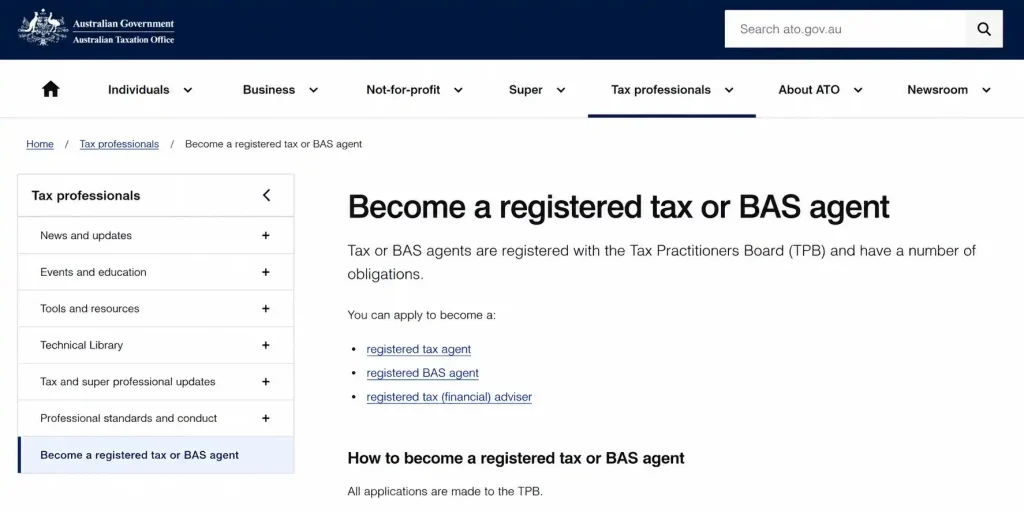
Before using ATO Online Services for Agents, you generally need to be an eligible tax or BAS professional registered with the Tax Practitioners Board (TPB). Your professional registration allows the ATO to recognise you as an authorised practitioner.
Step 2: Set Up Your Digital Identity
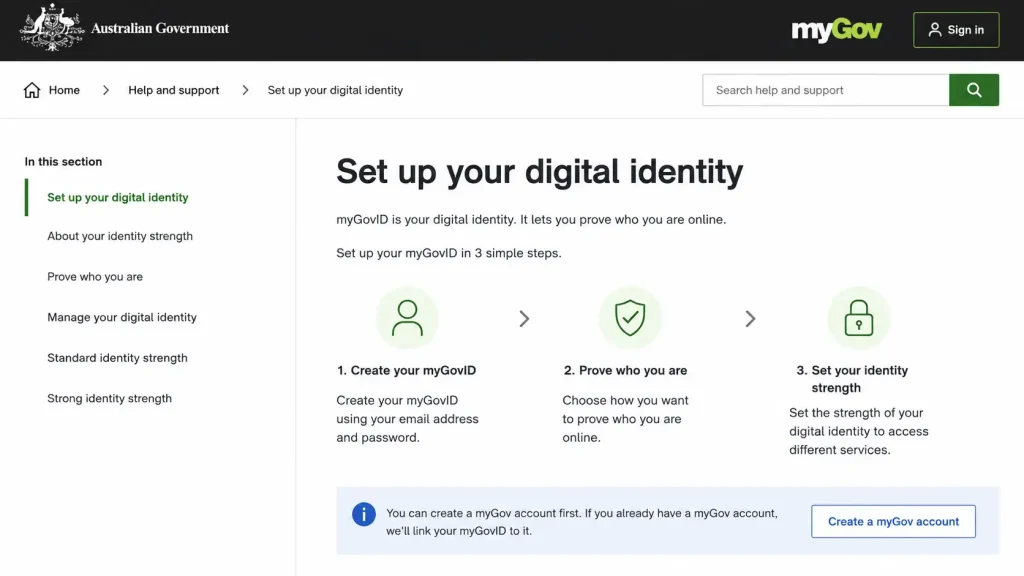
Set up the required digital identity and access arrangements for your professional role. Make sure your identity details match the information held by the relevant Australian government services.
Step 3: Link Your Practice to the ATO
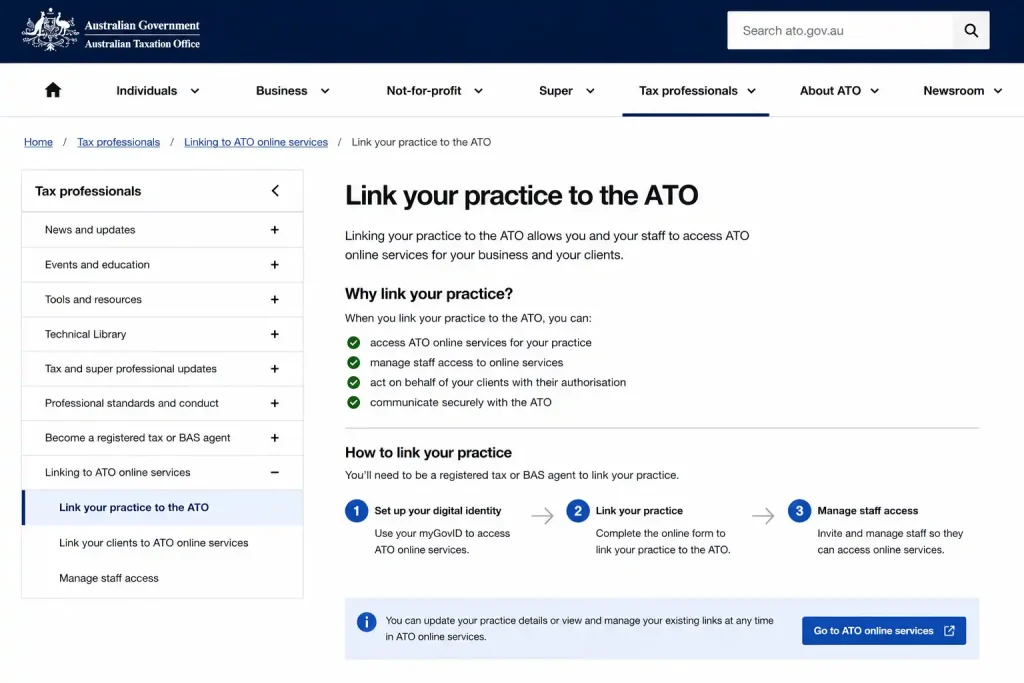
Once your professional details are established, follow the ATO process to connect your practice and access Online services for agents. Your practice structure and authorisations may determine what access you receive.
Step 4: Add or Link Authorised Staff
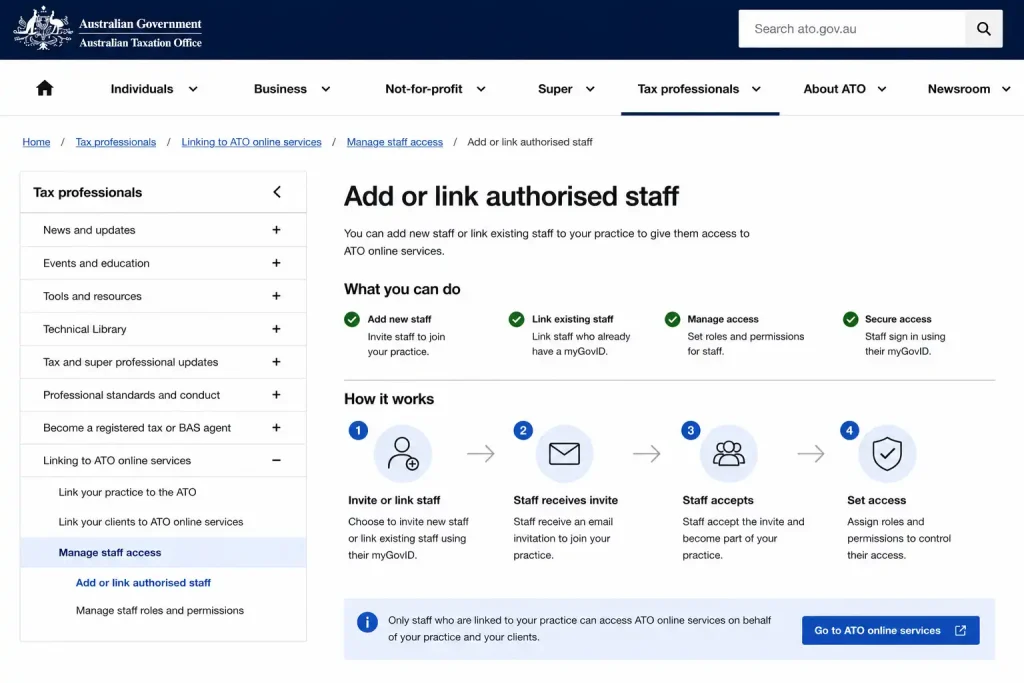
If you operate a tax practice with employees, authorised staff can be given appropriate access to perform tasks on behalf of the practice. Access should only be provided according to each staff member’s responsibilities.
Step 5: Add and Manage Client Authorisations
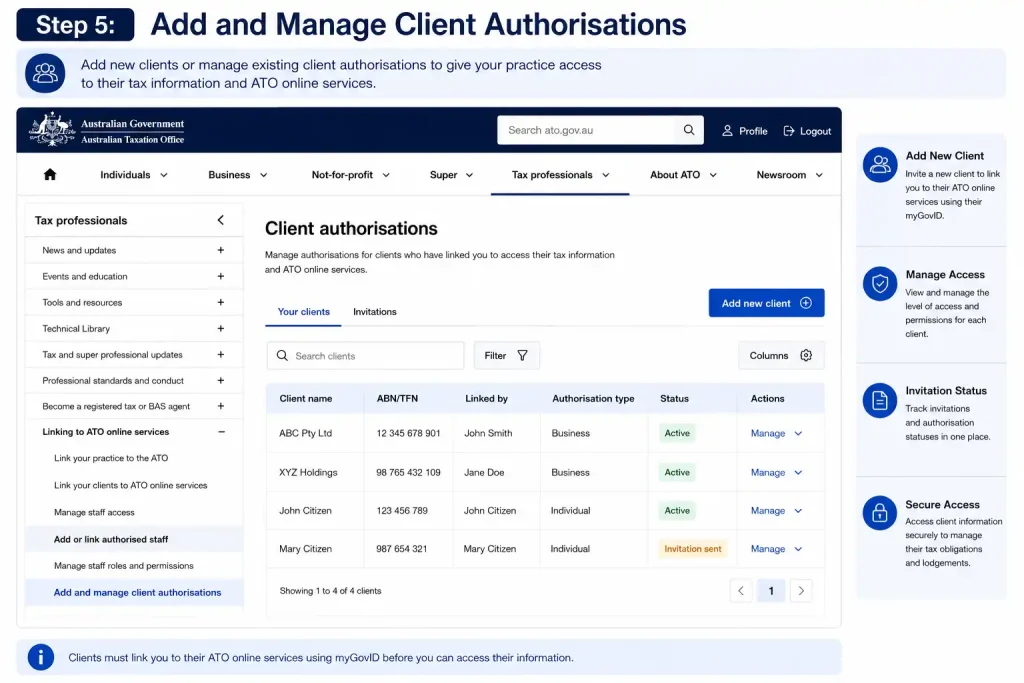
After your agent access is active, you can establish the required client relationships and authorisations. This allows you to access information and complete ATO tasks for clients you are authorised to represent.
Managing Client Linkages
A practitioner must have the correct authority before accessing a client’s tax affairs. Client-to-agent linking provides the formal connection between the client and the practice.
The client may nominate the practice through an available online service, after which the agent can process the relevant linkage request. The client then becomes available within the practice environment once the required authorisation has been established.
If a client cannot be found, check the linkage status before assuming that the system is unavailable.
Viewing Accounts and Payment Information
Account information helps practitioners understand a client’s outstanding obligations and available account details.
Within the relevant client record, authorised users can move to the accounts and payments area to review information and, where permitted, work with payment arrangements. This is particularly useful when a client has an outstanding liability that needs an agreed repayment structure.
Payment Plan Preparation
A payment arrangement generally requires the practitioner to consider the amount owing and proposed repayment terms. Relevant details can include an upfront amount, payment frequency and proposed final settlement date.
The available payment-plan functionality can be used to test proposed instalments against the system’s automated criteria before submission.
Lodging an Activity Statement
One of the key professional tasks available through ATO Online Services for Agents is preparing and lodging an activity statement for an authorised client. Before submitting, check the reporting period and confirm that the figures entered match the information supplied by the client.
Step 1: Open the Client Record
Sign in using your myID credentials and locate the relevant client by searching for their ABN or TFN. Select the correct client profile before opening the lodgment area.
Step 2: Select the Activity Statement
From the client record, open For lodgment and select Activity statements. Choose the required reporting period from the available list.
Step 3: Enter or Check the Figures
Review the relevant fields and enter the information provided for the reporting period. Depending on the statement, this may include:
Take care when reviewing figures because an incorrect amount can affect the client’s reported liability or refund.
Step 4: Calculate the Result
Use the Calculate function to review the resulting amount. Check the displayed liability or refund before moving towards submission.
Step 5: Confirm the Declaration
Before lodging, review the declaration and confirm that you are authorised to submit the statement on the client’s behalf.
Step 6: Submit the Statement
Select Submit after completing the required checks. A confirmation receipt containing a document identification number (DIN) is displayed after successful submission.
Setting Up a Client Payment Plan
When an eligible client has an outstanding tax account balance, an authorised practitioner can work through the payment-plan area to establish proposed repayment terms.
How the Payment Process Works
Open the relevant client profile and go to Accounts and payments, followed by Payment plans. Select Add to begin preparing the arrangement.
You may need to enter details such as the proposed upfront payment, repayment frequency and intended final settlement date. Available frequencies can include weekly, fortnightly or monthly payments.
The Payment Plan Calculator can then be used to assess whether the proposed instalments meet the system’s automated criteria. Before submitting, discuss the proposed arrangement with the client and confirm the required authorisation.
Reports and Pre-fill Information
Pre-fill information can reduce manual data entry by making available information accessible to the practitioner when preparing eligible tax work.
The reports area can be used to check available pre-fill information and relevant income tax data. Practitioners should still review the information carefully rather than assuming every available item is complete or correct.
A useful working approach is to compare available information with the records supplied by the client and investigate discrepancies before lodgment.
Using Practice Mail
Practice Mail provides a secure communication channel for authorised tax professionals dealing with ATO matters.
To start a message, open the communication area and select Practice mail, followed by the option to create a new message. Choose the appropriate client or matter where required and provide a clear description of the issue.
Keep messages focused on the matter being raised. Including relevant information in the initial communication can make it easier for the ATO to understand the request.
Common Access Problems
Access problems do not always mean that the ATO service itself is unavailable. In many cases, the issue is caused by a missing permission, an incomplete client linkage or an authentication problem.
Permission Missing
If an error indicates that access has been denied because a permission is missing, the staff member should contact the practice principal or authorised administrator.
The required permission can be reviewed and assigned through Access Manager if the user is entitled to perform that task.
Client Not Linked
A client record may not appear when the appropriate practitioner-client relationship has not been established.
Check whether the client has completed the required nomination or whether the agent still needs to submit the relevant linking request. The client should not be accessed until the required authority is in place.
myID Authentication Failure
An authentication problem may occur when the Digital ID session has expired or the required identity level has not been met.
Restarting the myID app and authenticating again may resolve a temporary session issue. Browser troubleshooting may also help when the problem is related to the online session.
System Maintenance
Sometimes an online function may be temporarily unavailable because of planned ATO maintenance or another service interruption.
Before repeatedly attempting the same task, check the ATO system status information to determine whether an outage or maintenance period has been reported.
Keeping Practice Access Secure
Good permission management is important when several employees use the same professional environment. Staff should receive access that matches their responsibilities rather than broad permissions that are not necessary for their work.
When an employee’s role changes or they leave the practice, their access should be reviewed promptly. Maintaining accurate authorisations helps protect client information and reduces the risk of inappropriate access.
Practical Checks Before Lodgment
Before submitting client information, a practitioner should verify the essentials:
These checks are particularly useful when a practice handles a high volume of client work.
What to Do When a Feature Is Missing
If a function that should be available does not appear, first consider whether the user has the required permission. Access Manager controls the operational rights available to practice staff, so the principal or administrator may need to review the user’s role.
If the permission is correct, check the client relationship and confirm that the user has selected the correct client record. For broader service interruptions, consult the relevant ATO system-status information.
Key Takeaway
ATO Online Services for Agents brings client management, lodgment, account administration, reporting and secure communication into a professional online environment. The most important part of using it effectively is ensuring that digital identity, business authorisation, staff permissions and client linkages are correctly established before professional work begins.
Managing Client Accounts
ATO Online Services for Agents allows authorised practitioners to manage important client account information from the client’s profile. After selecting the correct client, practitioners can review available account details, outstanding amounts and relevant payment information.
Client records should always be checked carefully before performing an action. Using the correct client profile helps ensure that lodgments, payments and other requests are handled against the intended account.
Reviewing Account Balances
Practitioners can access account information through the client’s profile and review available balances and liabilities. This information can help determine whether a client has an outstanding amount that requires attention.
When reviewing an account, compare the displayed information with the client’s records before discussing or arranging further action.
Managing Payment Plans
Payment plans can be accessed through Accounts and payments > Payment plans where the relevant functionality is available.
The practitioner can select the outstanding account, enter proposed repayment terms and review the arrangement using the available payment-plan calculator. Payment frequency may be set according to the available options, such as weekly, fortnightly or monthly.
Before submitting the arrangement, confirm the proposed terms with the client and complete the required authorisation.
Reviewing Pre-fill Information
The reports and pre-fill area provides access to available information that can assist with tax preparation.
Practitioners should review the available data carefully and compare it with information supplied by the client. Pre-fill information should be checked before it is relied upon for preparation or lodgment.
Using Practice Mail
Practice Mail provides a secure communication method for authorised practitioners dealing with the ATO.
To send a message, open Communication > Practice Mail and create a new message. Clearly describe the client matter and provide the relevant information needed for the ATO to understand the request.
Managing Client Linkages
Client-to-agent linking is required before an authorised practitioner can work with a client’s records through the professional service.
If a client does not appear in the practice’s records, check whether the client has completed the required nomination or whether the agent still needs to submit the appropriate linking request.
Troubleshooting Access Problems
Access Denied
If the system reports that a permission is missing, the practice principal or authorised administrator should review the staff member’s Access Manager permissions.
The required operational permission must be assigned before the employee can use that particular function.
Client Record Not Linked
If a client cannot be located, check the client’s relationship with the practice. A missing client linkage can prevent the practitioner from accessing the relevant record.
myID Authentication Failed
If authentication fails, the practitioner should restart the myID authentication process and sign in again. An expired session or insufficient identity level can prevent successful authentication.
System Maintenance
If the service is unavailable because of scheduled maintenance or another system issue, check the ATO system status information before attempting the transaction again.
Secure Practice Access
Practice administrators should ensure that staff members receive permissions appropriate to their responsibilities. Access should be reviewed whenever an employee’s duties change.
Keeping authorisations current helps practitioners maintain appropriate access to client information while allowing authorised staff to perform their assigned tasks.
ATO Online Services for Agents Key Functions
| Function | Purpose |
|---|---|
| Client Search | Find authorised client records |
| Client Linking | Connect clients with the practice |
| Activity Statements | Prepare and lodge relevant statements |
| Accounts and Payments | Review balances and payment arrangements |
| Reports and Pre-fill | Access available tax information |
| Practice Mail | Communicate securely with the ATO |
| Access Manager | Manage staff permissions |
Before Submitting a Client Transaction
Check the client record, reporting period and information entered before submitting any transaction. Review the calculated result where applicable and confirm that you have the required authority to act for the client.
After a successful lodgment, retain the confirmation details, including the document identification number where provided.
Final Steps for Using the Service
A reliable workflow begins with correct access setup and continues with accurate client linking, appropriate staff permissions and careful review of client information.
When using ATO Online Services for Agents, practitioners should confirm the correct client, verify the information being submitted, review account details and use the appropriate communication or payment function for the matter being handled.
FAQS
Final Thoughts
ATO Online Services for Agents provides authorised tax and BAS professionals with a central online environment for managing client records, lodgments, account information, payment arrangements and secure ATO communication. Effective use starts with the correct myID, RAM and Access Manager setup, followed by accurate client linking and appropriate staff permissions.
Before completing any client task, verify the correct client record, check the relevant information and confirm that the required authority is in place. With these steps followed carefully, practitioners can use the service to manage routine tax administration and client matters in a structured and secure way.
ATO Portal (2026) Australia: Complete Guide to Login, Tax Returns, TFN & Superannuation
Passport Renewal (2026): Australian Online Application, Requirements & Lodgement
Prodigy (2026) Austraila: Complete Guide to Math & English Learning, Login, Accounts & Gameplay