

Atomi is a digital learning platform created to support Australian secondary school students from Years 7–12. It brings together syllabus-aligned video lessons, interactive quizzes, revision materials and teacher-assigned activities, making it easier for students to study both in and outside the classroom. The platform can support students preparing for pathways such as the HSC, VCE, QCE, WACE and SACE.
Rather than relying on separate textbooks, notes and revision websites, students can use Atomi to access learning materials, complete activities and review their progress from one place. Schools can also use the platform to provide structured learning tasks and monitor student engagement.
For students who need a more organised way to revise subjects, complete schoolwork and prepare for assessments, Atomi provides a central learning environment with resources designed around Australian curriculum requirements.
What Is Atomi?
Atomi is an online education platform aimed at Australian high school students. It provides curriculum-related learning content through short videos, quizzes, practice questions and progress information, allowing students to work through subjects in a structured way.
The platform arranges learning materials around relevant subjects and syllabus areas, so students can spend less time searching for suitable resources. Instead, they can move directly to the topic they need to study and use lessons and practice activities to strengthen their understanding.
Key areas supported by Atomi include:
The subjects available to an individual student can depend on their school, year level and selected curriculum.
Why Australian Students Use Atomi
Keeping up with lessons, homework, assignments and exam revision can be difficult when study materials are spread across different platforms. Atomi brings several learning and study functions together, giving students a more organised way to manage their academic work.
| Feature | Benefit |
|---|---|
| Video Lessons | Explain difficult concepts in shorter, easier-to-follow sections |
| Interactive Quizzes | Give students an opportunity to check their understanding |
| Progress Tracking | Shows learning activity and areas that may need more attention |
| Assignment Tools | Helps students keep track of teacher-directed activities |
| Curriculum Alignment | Organises resources around relevant Australian educational requirements |
| Revision Support | Provides additional practice for tests and examinations |
The main advantage is organisation. Students can move from learning a concept to testing their understanding and revising the same topic without having to search for separate resources.
Main Areas of the Atomi Platform
After signing in, students can use different areas of Atomi to access lessons, subjects, tasks and learning information. The exact options available may depend on how their school has set up the platform.
Dashboard
The dashboard provides the main starting point for student activity. It can bring together subjects, assigned work, recently accessed lessons and other useful learning information.
Students may be able to view:
This gives students a quick overview of what they have been studying and what may require attention next.
Courses Section
The Courses area contains the subjects available to the student. Content is organised into smaller learning units so that students can work through a subject in a logical order.
A course may include:
Breaking a subject into these smaller sections makes it easier to focus on one concept at a time instead of approaching an entire course as one large block of material.
Learning Content
Atomi lessons can combine several types of educational material to support understanding and practice. A typical learning activity may use video explanations alongside questions or knowledge checks.
Learning content can include:
This structure encourages students to do more than simply watch a lesson. They can use questions and activities to check whether they have understood the material.
Task Management
Teachers can use Atomi to provide students with activities and other assigned work. This gives students a central place to review tasks and understand what needs to be completed.
Students may be able to:
Keeping these details together can make it easier to organise schoolwork, particularly when several subjects have assignments at the same time.
Performance Analytics
Atomi’s analytics features can give students insight into their learning activity and performance. Instead of relying only on completed lessons, students can use available performance information to identify topics that may need further revision.
Depending on the available features, performance information may include:
Reviewing this information regularly can help students decide where to spend their next study session.
Getting Started With Atomi
Students need access to an Atomi account before they can use the platform’s lessons, courses and study resources. The sign-up process can vary depending on whether access is provided directly by a school or through another registration method.
Accessing the Platform
Start by opening the official Atomi Australia website. From there, students can select the appropriate option to access an existing account or begin the registration process if they have not used Atomi before.
If a school has already provided access, students should follow the instructions supplied by their teacher or school rather than creating an unrelated account.
Registration Options
The registration method depends on how a school has configured access to Atomi. Students may receive an invitation or be given another way to connect their account with their school.
Possible registration methods include:
Not every student will see all of these options, so the available method may differ between schools and accounts.
Creating Your Student Profile
During account setup, students may need to provide or confirm information used to connect them with the appropriate learning content.
This can include:
Providing the correct information helps ensure that the student’s available courses and learning resources match their academic situation.
Atomi Login Process Explained
Accessing an existing Atomi account normally requires only the student’s registered sign-in details or an approved school authentication method.
Standard Login Method
For a standard account login, students generally need to:
- Open the Atomi website.
- Select the login option.
- Enter the email address associated with the account.
- Enter the account password.
- Sign in to reach the student dashboard.
Once authenticated, students can continue to their available subjects, tasks and learning resources.
Google Sign-In
Students whose schools use Google Workspace for Education may be able to authenticate through their school Google account. This can reduce the need to remember a separate Atomi password.
If Google sign-in is enabled for the student’s school account, the student can select the relevant Google option and follow the on-screen authentication process.
Microsoft Sign-In
Schools that use Microsoft 365 or related Microsoft education services may provide Microsoft-based authentication. This allows students to use their existing school credentials where the option is supported.
Using a school authentication method can make access more convenient because students do not necessarily need to manage another separate login.
Login Security Tips
Students should take basic precautions when accessing their Atomi account, particularly when using shared or public computers.
Useful practices include:
If login problems continue, students should check their credentials first and then follow their school’s support process if the issue cannot be resolved.
Atomi Registration Steps (Student Account Setup)
Step 1: Open the Atomi Platform
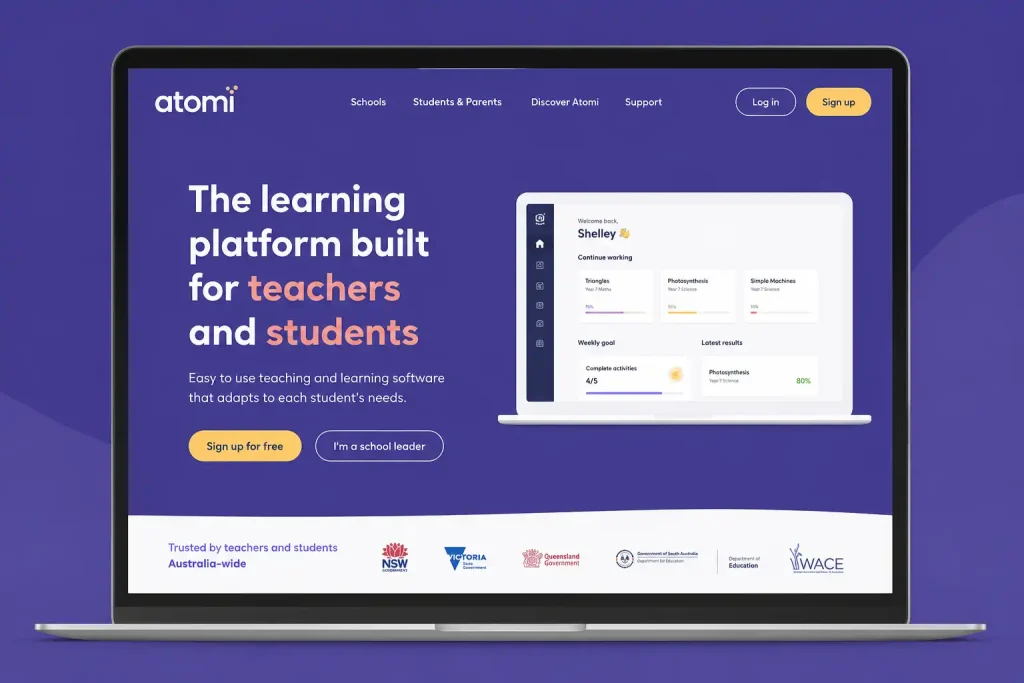
Visit the Atomi website and select Sign Up or Log In to begin the registration process.
Step 2: Choose Your Sign-Up Method
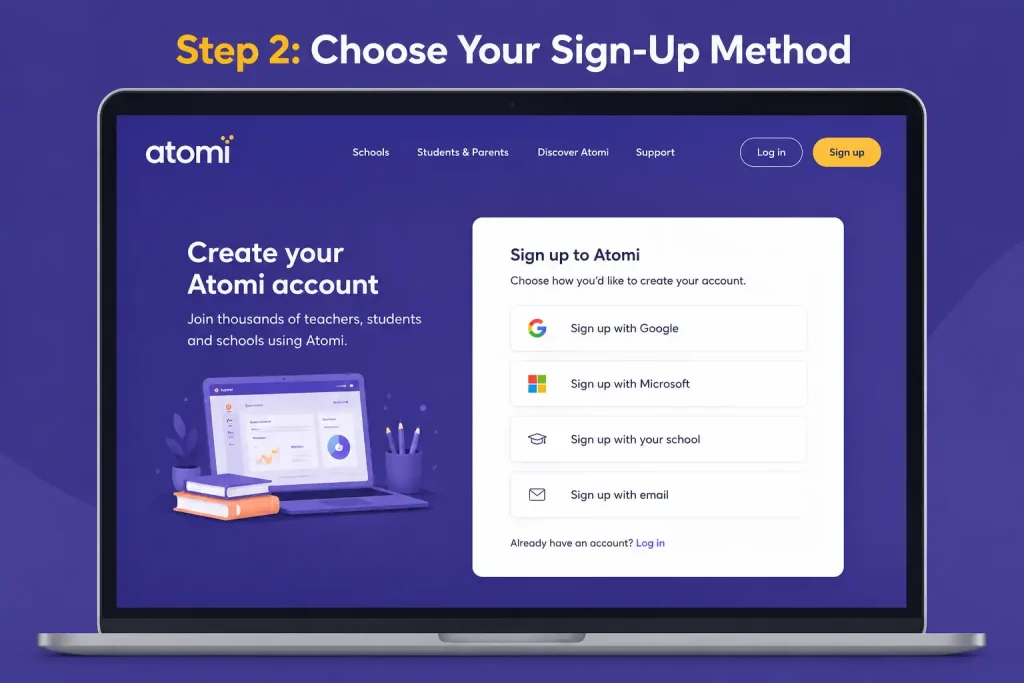
Register using a teacher-provided class code, school invitation, Google account, Microsoft account, or an email address.
Step 3: Create Your Student Profile
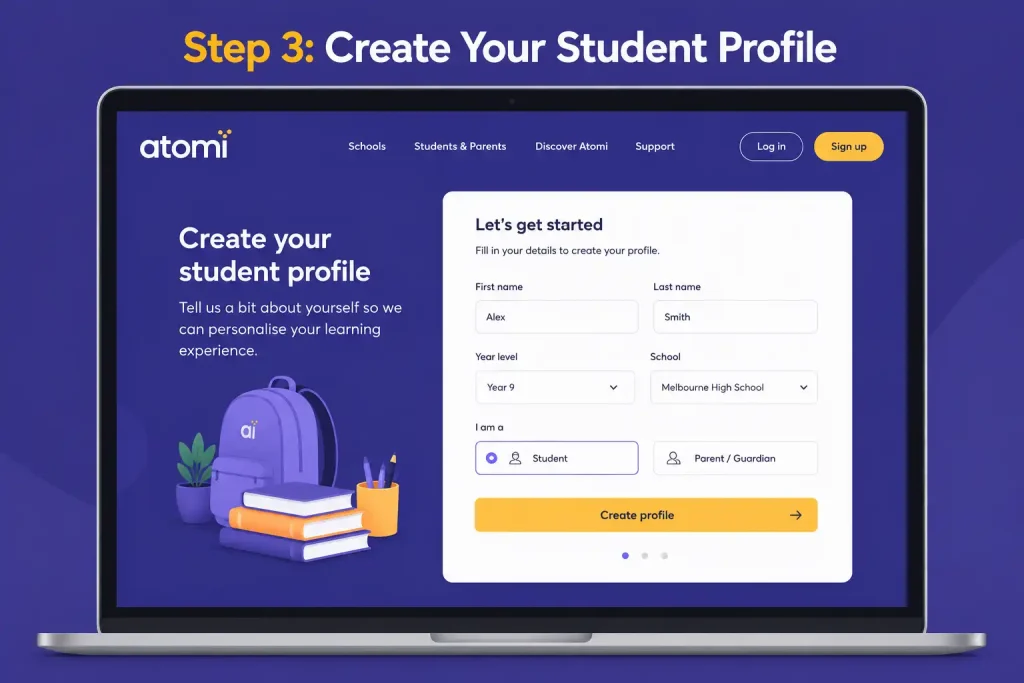
Enter your personal details, choose Student, and provide information such as your school, year level, and curriculum.
Step 4: Verify and Activate Your Account
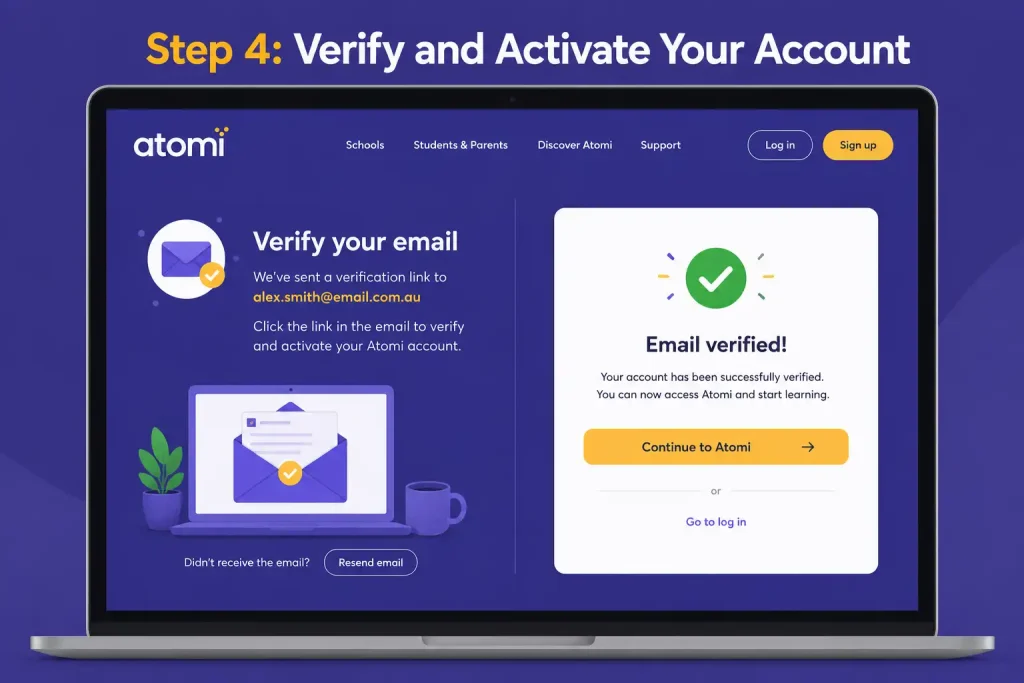
Confirm your email address or complete the authentication process through your chosen sign-in method to activate your account.
Step 5: Access Your Dashboard
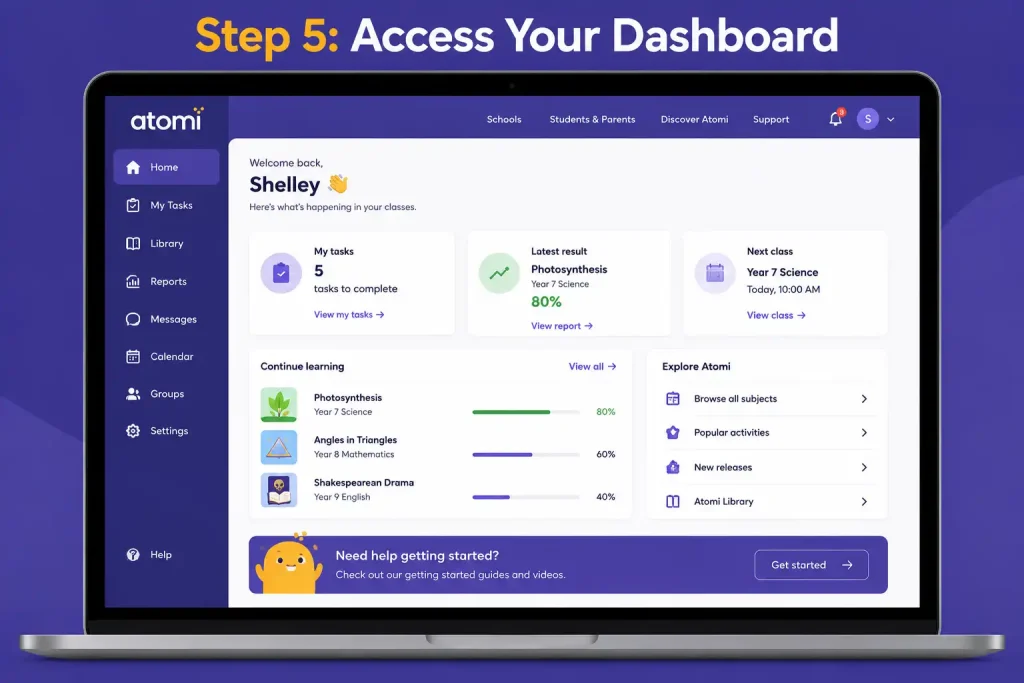
Sign in to your new account, add your subjects, join any assigned classes, and start using Atomi lessons, quizzes, and study tools.
Understanding the Atomi Learning Structure
Atomi presents learning content in a sequence that allows students to progress from a broad subject area to individual lessons and practice activities.
A typical learning path can be understood as:
Dashboard → Subject → Module → Topic → Video Lesson → Quiz → Practice Activities → Revision
Students can use this structure to move through new material, test their understanding and return to areas that require additional practice. The exact layout may vary according to the course and account configuration.
Choosing Subjects and Courses
The subjects visible in an Atomi account depend on the student’s enrolment, year level and the courses made available through their school or account.
Selecting Curriculum Areas
Atomi supports learning resources connected with different Australian educational pathways. Examples include:
Selecting the appropriate curriculum area helps students work with resources that are relevant to their school requirements and assessment pathway.
Adding New Subjects
Where account permissions allow additional subjects to be added, students can select courses that match their academic needs. Availability may depend on school enrolment, year level and the access provided to the account.
Students may consider subjects based on:
Choosing subjects carefully keeps the dashboard focused on the learning areas that matter most.
Managing Existing Subjects
Students may also organise their available courses around current priorities. During an assessment period, for example, they may want to give more attention to subjects with upcoming tests or assignments.
Keeping frequently used courses easy to access can reduce unnecessary navigation and make study sessions more focused.
Using Video Lessons Effectively
Video lessons are a central part of Atomi’s learning experience. They are designed to present curriculum concepts in a visual format and can be used when introducing a topic, reviewing a difficult idea or preparing for an assessment.
Benefits of Video-Based Learning
Video-based lessons can make complex information easier to approach by dividing a topic into smaller explanations. Students can also revisit material when they need another explanation rather than relying on a single classroom lesson.
Potential benefits include:
For better results, students should avoid treating videos as something to watch passively. Pausing to think about an explanation, taking brief notes and completing the related questions can make revision more active.
Playback Controls
Depending on the lesson and available platform features, students may have controls that allow them to adjust how they consume the content.
These can include:
Students can use these controls to match the lesson to their preferred study pace. For difficult topics, slowing down or replaying a particular explanation can be useful, while familiar material may be reviewed more quickly.
Making the Most of Atomi Quizzes and Practice Activities
Completing a video lesson is only the beginning of the learning process. Atomi also gives students opportunities to check what they have understood through quizzes and practice activities linked to their study material.
Using these activities after a lesson can help students recall key information, spot areas they have not fully understood and strengthen their knowledge through repeated practice.
How Interactive Quizzes Work
Once a lesson has been completed, students can work through questions based on the topic they have just studied. These checks give them a chance to apply the information rather than simply move on after watching the lesson.
Quiz and practice formats may include:
Feedback provided during the activity can help students recognise mistakes while the topic is still fresh in their minds.
Why Quizzes Matter
Active recall is a useful part of effective study because it requires students to retrieve information rather than simply read it again. Using questions after a lesson gives students a practical way to check whether they can remember and apply what they have learned.
Regular quiz practice can help students:
For students working towards senior secondary examinations, making quizzes part of regular revision can provide an additional way to practise syllabus-related knowledge.
Understanding Task and Assignment Management
Atomi can also be used by schools to organise learning activities and keep track of student participation. Teachers can assign lessons, quizzes and revision work through the platform, giving students a central place to check what they need to complete.
Viewing Assigned Tasks
The Tasks section brings assigned activities together so students can see what needs to be completed and when it is due.
Students can use it to check:
Checking this area regularly can make it easier to stay on top of school responsibilities and avoid overlooking an assignment.
Task Categories
Assigned activities may be separated into different status categories, allowing students to see which pieces of work still need attention.
To Do
This category identifies assignments or activities that have not yet been completed and still require action.
In Progress
Activities that have already been started but remain unfinished can appear in this section, helping students identify work that needs to be continued.
Completed
Finished activities are grouped here, giving students a record of work they have already completed or submitted.
Overdue
This category draws attention to activities whose deadlines have already passed. Reviewing overdue work can help students decide which outstanding tasks should be dealt with first.
Regularly checking these categories can make day-to-day study management more organised throughout the school year.
Progress Tracking and Academic Analytics
One of Atomi’s useful features is the ability to record learning activity and performance information. Rather than relying entirely on memory to decide which subjects need more revision, students can use available data to guide their study choices.
What Progress Data Shows
The information available can vary by course and account settings, but students may be able to review details such as:
Looking at these indicators can help students recognise patterns in their learning and decide which areas deserve more attention.
Subject Mastery Indicators
Mastery indicators provide an overview of how well a student is performing in particular areas of a subject. They can be useful when deciding whether a topic needs another round of revision.
Higher mastery levels may be associated with:
A lower result can act as a useful signal that the student should return to the relevant material and complete more practice.
Weekly Activity Monitoring
Study time can be difficult to judge without keeping a record of learning activity. Where activity tracking is available, students can use it to see how regularly they are engaging with their courses.
Tracked information may include:
Seeing these patterns can encourage students to build a more regular study routine instead of relying on occasional long sessions.
How Atomi Supports Exam Preparation
Atomi can be particularly useful during Years 11 and 12, when students need to revise syllabus content and prepare for major assessments. Its combination of structured lessons, practice activities and progress information allows students to revisit specific areas instead of treating the entire subject as one revision task.
HSC Revision Support
Students following the NSW curriculum may use Atomi as part of their HSC preparation. Topic-focused resources can make it easier to return to specific areas of the syllabus and practise relevant knowledge.
Useful elements can include:
VCE Preparation
Victorian students can use relevant Atomi resources to review VCE subject material and strengthen their understanding of important concepts and assessment areas.
Working through lessons and related practice activities can provide another way to reinforce classroom learning.
QCE Exam Readiness
For Queensland students, Atomi can be used to revisit course material and practise concepts before internal and external assessments.
Regular revision can help students identify areas where their understanding needs further development before an assessment takes place.
Other State Curricula
The platform also provides support for students following areas such as:
Organising learning around curriculum requirements can help students concentrate on relevant outcomes instead of spending excessive time searching for suitable study material.
Creating an Effective Study Routine With Atomi
Atomi is generally more useful when students incorporate it into their normal study routine instead of opening the platform only when an examination is approaching. Regular engagement allows students to build knowledge gradually and identify weak areas earlier.
Recommended Weekly Study Structure
A balanced routine could look like this:
| Activity | Suggested Frequency |
|---|---|
| Video Lessons | Daily |
| Interactive Quizzes | After each lesson |
| Topic Revision | Weekly |
| Assignment Review | Several times per week |
| Progress Analysis | Weekly |
| Exam Practice | Regularly before assessments |
The exact schedule should reflect the student’s workload and upcoming assessment dates. Short, consistent study sessions can be easier to maintain than irregular periods of intensive revision.
Combining School Learning With Atomi
Atomi can work alongside normal classroom teaching rather than replacing it. Students can use the platform to revisit material introduced at school and then test their understanding through practice.
A practical routine is:
- Attend the relevant school lesson.
- Review the same topic through Atomi.
- Complete the related quiz or practice activity.
- Note any areas that remain unclear.
- Revisit difficult concepts.
- Use available progress information to check improvement.
Repeating this process can help connect classroom instruction with independent study.
Features That Help Independent Learners
Students do not always learn at the same speed or need the same amount of revision. Atomi’s learning resources can give students more control over when they study and which areas they revisit.
Flexible Learning
Students may be able to:
This flexibility can be particularly useful when students need to fit revision around school, homework and other commitments.
Search Functionality
The search function can help students locate relevant learning material without manually browsing through every course section.
Students can search for:
Finding specific content more quickly can leave more time for actual study and practice.
Personalised Learning Experience
Progress information can help students make study decisions based on their actual performance. Instead of giving every subject the same amount of revision time, students can identify areas where additional practice appears necessary.
For example, weaker quiz results may indicate that a topic deserves another review, while consistently strong performance can show that less time is currently needed in that area.
Best Practices for Getting Better Results
Students can get more value from Atomi by using its learning and practice features together rather than relying on one activity. A consistent approach also makes it easier to notice weaknesses before major assessments.
Useful habits include:
The aim is not to spend as much time as possible on the platform. It is to use the available tools purposefully and make each study session count.
Common Mistakes Students Should Avoid
Students may have access to useful learning resources but still get limited value from them if they use the platform inconsistently. Certain habits can make revision less effective.
Common mistakes include:
A better approach is to use lessons, quizzes, assignments and progress information together. This creates a more balanced study routine and gives students a clearer picture of where further revision is needed.
Troubleshooting Common Atomi Problems
Atomi is generally straightforward to use, but students can sometimes run into login, course, video, quiz, or account-related problems. Most minor issues can be resolved by checking account details, browser settings, or the internet connection before contacting school support.
Knowing what to check first can save time and help students get back to their lessons without unnecessary disruption.
Unable to Sign In
A student may be unable to access Atomi because of incorrect account details, an expired school account, or selecting a sign-in method that doesn’t match their account.
Common causes include:
Recommended Solutions
Try these steps before requesting further assistance:
If none of these steps work, your school or teacher may need to check whether your account is active.
Class Code Not Working
A class code may not work if it has been entered incorrectly, contains additional spaces, or is no longer valid. Students should check the code carefully before assuming there is a problem with their account.
Students should:
Using the most recent code supplied by the school or teacher can help avoid registration problems.
Missing Subjects on the Dashboard
A subject that should be available may sometimes be missing from the student’s dashboard. This can happen when account details or school enrolment information do not match the expected course setup.
Possible reasons include:
Checking the relevant profile information may resolve the issue. If the expected subject still doesn’t appear, the school may need to review the student’s account or course access.
Video Playback Issues
Problems such as buffering, interrupted playback or videos that fail to load can make it difficult to complete a lesson. These issues are often related to the internet connection, browser configuration or device settings.
Common causes include:
Students can try the following:
If videos work normally on another network or device, the original connection or device settings may be causing the problem.
Quiz or Progress Not Updating
Sometimes a completed quiz or lesson may not immediately show the expected progress update. Before assuming that the activity has been lost, students should check that the activity was fully completed and that their connection remained active.
Students should:
If the progress still doesn’t appear after these checks, contacting school support staff may be the best next step.
Atomi for Teachers and Schools
Atomi isn’t only useful for individual students. Schools and teachers can also use the platform to organise learning activities, monitor participation and support students throughout their courses.
Teachers can:
This gives teachers and students a shared learning environment where assigned work and progress can be managed more efficiently.
How Schools Use Atomi
Schools can incorporate Atomi into different parts of their academic programmes. Depending on the school’s approach, the platform may support classroom teaching as well as independent work outside school hours.
Common uses include:
Because the available learning content is organised around Australian curriculum requirements, teachers can use relevant resources alongside their existing teaching plans.
Tips for Parents Supporting Student Learning
Parents can play an important role in helping students develop consistent study habits. While students remain responsible for their own learning, a supportive home environment can make it easier to maintain regular revision and complete schoolwork on time.
Parents can help by:
The aim isn’t to manage every study session. Instead, parents can encourage consistency and help students develop routines that work for their school workload.
Advantages of Using Atomi
Atomi brings several learning functions together, which can make it a practical option for Australian secondary students who want their lessons, practice and revision resources organised in one place.
Key advantages include:
Curriculum Alignment
Atomi’s learning materials are organised around Australian curriculum and syllabus requirements, helping students work with content relevant to their educational pathway.
Flexible Access
Students can use the platform from different locations, including home, school, libraries or while travelling, provided they have suitable internet access and an available account.
Structured Revision
Organised courses and topic-based resources give students a clearer way to work through revision instead of searching across multiple sources.
Immediate Feedback
Interactive activities can provide feedback that helps students recognise mistakes while they are still working on a particular topic.
Performance Monitoring
Available progress information gives students a way to review their learning activity and identify areas that may require additional attention.
Time Efficiency
Having lessons, quizzes and revision resources together can reduce the need to search through several websites, textbooks and separate study tools.
Frequently Asked Questions
Final Thoughts
Atomi provides Australian secondary students with a central place to access learning content, practise concepts, manage assigned activities and review their progress. Its combination of video lessons, quizzes, revision resources and performance information can support students across different stages of their secondary education.
The platform can be useful whether a student is building foundational knowledge in the earlier years of secondary school or preparing for senior assessments. Making regular use of lessons, practice activities and progress information can help students stay organised, recognise areas that need more work and approach assessment periods with a clearer study plan.
READ MORE:
Essential Assessment (2026): Student Login, Teacher Setup, Assessments & Reports Guide
Business Portal Australia: Complete Guide to ABN, Business Registration & Tax Setup
myGov Australia (2026): Complete Guide to Login, Services & Account Access