

The NSW Planning Portal is a central online platform that supports planning and development activities throughout New South Wales. It allows homeowners, developers, planning professionals, certifiers, researchers, students and members of the public to access a wide range of planning services from a single digital location.
Whether you are preparing a development proposal, researching planning controls, tracking an application or reviewing information about a property, the NSW Planning Portal provides convenient access to planning tools and resources. By bringing multiple planning functions together in one system, the platform helps simplify processes that were previously handled through separate channels.
For first-time users, planning procedures and terminology may appear complex. The portal is designed to make these processes easier to understand by offering online lodgement services, document management tools, application tracking features and access to publicly available planning information.This guide explores the major features of the NSW Planning Portal, including account registration, login procedures, application lodgement, document submission, property research, application tracking and planning-related services. Visit Homepage
What Is the NSW Planning Portal?
The planning portal nsw is an online planning service connected to the NSW Government planning framework. It enables individuals, businesses and planning professionals to interact with planning processes digitally while providing access to information about development and land use across New South Wales.
The platform serves as a gateway for many planning-related activities. Depending on the purpose of your visit, you may use the portal to submit applications, upload supporting documents, review planning records, monitor application progress or conduct property-based research.
By digitising planning services, the portal helps streamline communication between applicants, councils, certifiers and other stakeholders involved in the planning process.
Who Can Use the NSW Planning Portal?
The portal is designed to support a broad range of users, including:
Many planning records and search tools can be accessed without maintaining an applicant account, while personalised services require registration and login.
How to Register for an NSW Planning Portal Account
Before beginning registration, always confirm that you are accessing the official NSW Government planning platform rather than an unofficial website or third-party service.
Step 1: Open the NSW Planning Portal

Visit the official NSW Government planning website and navigate to the planning portal nsw login section. Accessing the correct portal is important because planning applications often contain sensitive personal, business and property information.
Step 2: Choose Account Registration

Locate the account creation or registration option. Depending on the available authentication methods, users may be able to register using government-linked credentials or an email-based registration process.
Step 3: Enter Your Personal Information

Provide the information requested during registration. This may include:
Carefully review all information before moving forward to reduce the likelihood of future account issues.
Step 4: Complete Verification Requirements
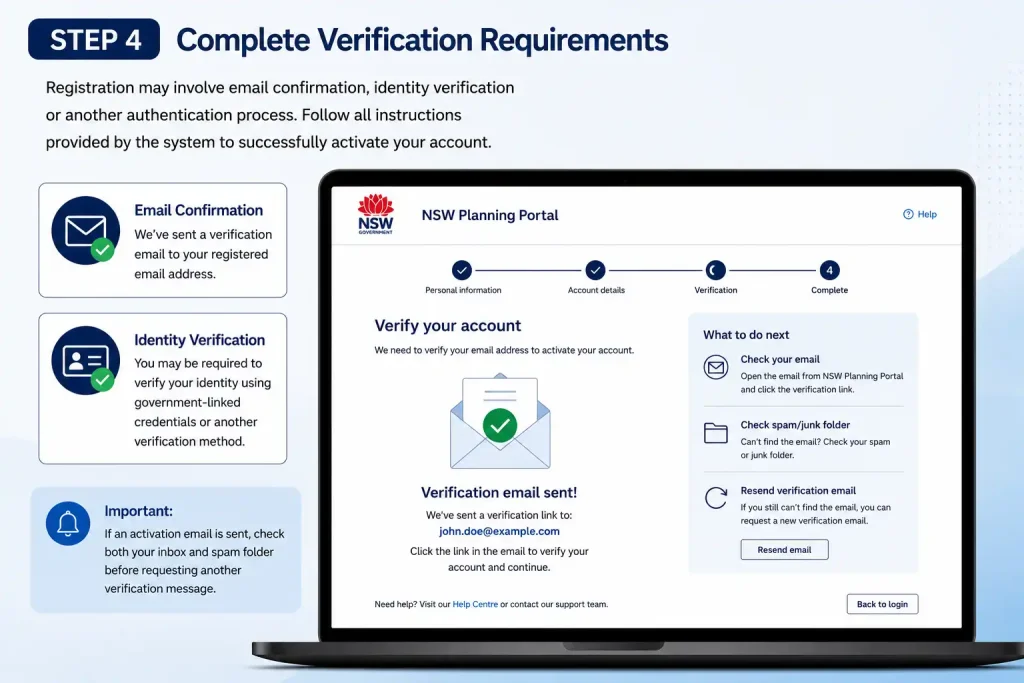
Registration may involve email confirmation, identity verification or another authentication process. Follow all instructions provided by the system to successfully activate your account.
If an activation email is sent, check both your inbox and spam folder before requesting another verification message.
Step 5: Access Your Account Dashboard
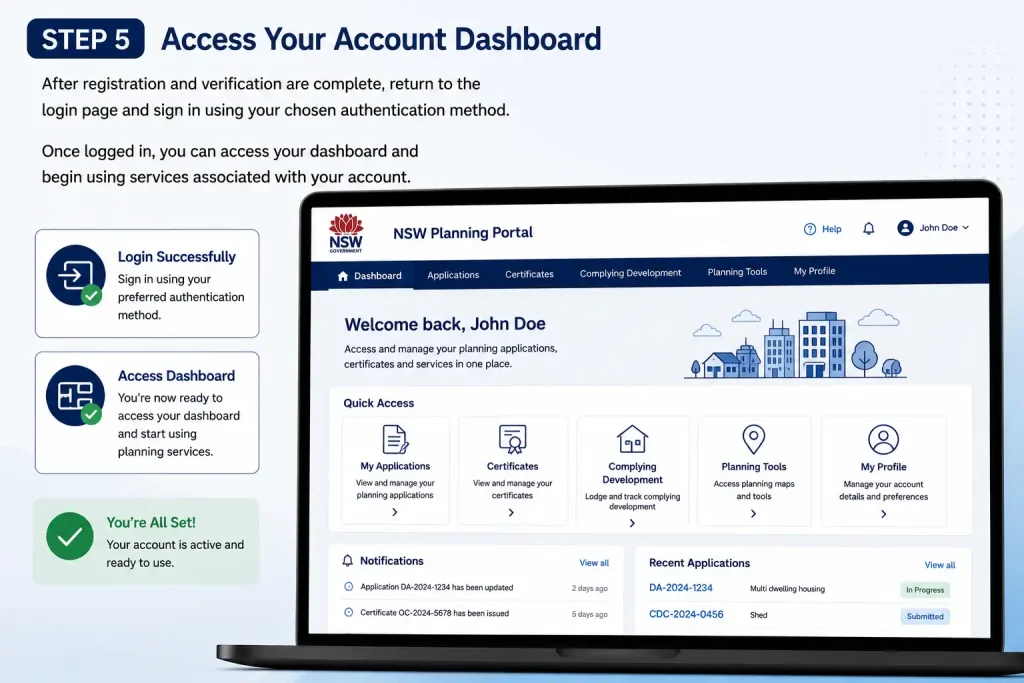
After registration and verification are complete, return to the login page and sign in using your chosen authentication method.
Once logged in, you can access your dashboard and begin using services associated with your account.
What Can You Do Through the NSW Planning Portal?
The planning portal nsw offers significantly more than basic account access. It acts as a digital workspace where users can complete a variety of planning-related activities throughout the lifecycle of an application.
Submit Development Applications
Users can lodge various planning applications through the platform, including Development Applications and other planning submissions required under NSW planning processes.
Digital submission helps centralise information and allows applicants to manage many stages of the process online.
Manage Planning Documents
Applications often require supporting documentation such as:
The portal enables applicants to upload, organise and manage these documents throughout the assessment process.
Monitor Application Status
Instead of relying solely on emails or phone enquiries, applicants can use their dashboard to review the progress of submitted applications.
Status updates provide visibility into different stages of assessment and help users understand where their application currently sits within the approval process.
Access Planning Information
The portal also provides tools for researching planning information connected to properties and development proposals across NSW.
Researchers, property buyers, neighbours and students may find these search functions particularly useful when investigating planning activity.
Lodging a Planning Application
One of the primary functions of the planning portal nsw is the digital lodgement of planning applications. While procedures vary depending on the application type, the general process follows several common stages.
Start a New Application
After signing in, navigate to the application lodgement area and select the type of planning application you wish to submit.
Depending on your circumstances, options may include:
Selecting the correct application category helps ensure that the proposal is assessed through the appropriate process.
Identify the Development Site
Accurate property identification is essential.
Applicants may be required to provide:
The system uses this information to connect the proposal with relevant planning controls and land records.
Describe the Proposed Development
Provide a clear and accurate description of the proposed works.
Examples may include:
A detailed description assists assessing authorities in understanding the nature and scope of the proposed development.
Select the Appropriate Assessing Authority
Applications must be directed to the authority responsible for assessment.
Depending on the project, this may include:
Selecting the correct authority is an important part of the submission process.
Review and Submit
Before final submission, carefully examine all information entered into the application.
Check:
Correcting errors before submission can help minimise delays and requests for clarification later in the assessment process.
Once satisfied that all information is accurate, submit the application through the portal.
NSW Planning Portal Application Tracking
Application tracking is one of the most valuable features available through the planning portal nsw. It allows applicants and, where applicable, members of the public to monitor planning proposals and assessment progress.
Track Your Own Application
Users who have lodged applications through their account can access application records directly from their dashboard.
Depending on the application stage, status information may indicate that an application is:
The information displayed will vary according to the application type and current workflow stage.
Search Public Applications
Public search tools can assist users who wish to investigate development activity within a particular area.
Available search functions may allow users to locate planning information using:
These searches are particularly useful for neighbouring property owners, planning researchers, prospective purchasers and community members seeking information about local development proposals.
By making planning information easier to access, the planning portal nsw helps improve transparency and provides greater visibility into development activity occurring across New South Wales.
Understanding Your NSW Planning Portal Dashboard
After signing in to the NSW Planning Portal, your dashboard becomes the main workspace for managing planning activities linked to your account. It provides a central location where you can view applications, monitor progress, upload information and respond to requests from assessing authorities. Whether you are a homeowner lodging a small residential proposal or a developer managing multiple projects, the dashboard helps keep all relevant records organised in one place.
Applications are typically grouped according to their current stage, making it easier to understand which matters still require attention and which have already been finalised. Users handling multiple applications can benefit from the dashboard’s search and filtering tools, which help locate specific records quickly without having to manually review every application.
Active Work and Completed Work
The dashboard commonly separates applications into Active Work and Completed Work categories.
Applications that are currently being prepared, assessed, reviewed or processed generally appear within the Active Work section. This area allows users to monitor ongoing planning matters and take any required actions.
Applications that have been approved, determined, withdrawn, cancelled or otherwise finalised can usually be found within the Completed Work area. Keeping completed applications separate from active matters makes it easier to focus on tasks that still require attention.
When managing several planning records, the search and filter features can significantly reduce the time needed to locate a particular application. Users can search using available identifiers and quickly narrow results based on status or application type.
Checking Application Status
The status section provides a quick overview of where an application currently sits within the planning process. Depending on the stage of assessment, different status indicators may appear.
For example, an application may show that it is:
It is important to remember that a status update does not always indicate that a final planning decision has been made. Applicants should review any messages, notifications and requests associated with the application before deciding whether further action is required.
Carefully reading application records can help ensure that important requests or updates are not overlooked during the assessment process.
How to Check an NSW Planning Portal Application
Applicants can review the status of their own planning applications directly through their account dashboard. The portal provides tools that allow users to locate applications, view status information and access related records.
Monitoring an application regularly can help ensure that requests for clarification or additional documentation are identified and addressed promptly.
Step-by-Step Application Status Check
Follow these steps to review an application through the planning portal nsw:
- Sign in to your planning portal nsw account.
- Open the main application dashboard.
- Use the search or filtering tools to locate the relevant application.
- Check whether the application appears under Active Work or Completed Work.
- Review the current status displayed for the application.
- Open the application record to read any additional information, requests or updates.
Applicants should periodically check their dashboard rather than relying solely on email notifications, as important updates may be available within the application record itself.
If you are not the applicant, public development information may still be available through the Application Tracker or through council-operated planning tracking systems, depending on the circumstances.
Using the NSW Planning Portal for Property Research
Property research is often one of the first steps in the planning process. The planning portal nsw offers access to mapping tools and planning information that can help users understand the characteristics and planning controls affecting a site.
Before preparing development plans or spending money on detailed documentation, it is generally beneficial to investigate the planning context of a property.
The Spatial Viewer allows users to search for a property and explore information related to zoning, development controls and other planning considerations that may influence future proposals.
What Property Information Can You Investigate?
Depending on the location and the available planning data, users may be able to investigate information such as:
Access to this information can help users gain a better understanding of what may or may not be possible on a particular property before commencing a planning project.
Why Check the Property Before Applying?
One of the most common planning mistakes is preparing detailed application material before researching the planning controls affecting the site.
Property investigations can identify issues that may influence project design, documentation requirements or approval pathways. For example, zoning requirements, heritage considerations, environmental constraints or bushfire-related controls may affect how a proposal needs to be prepared.
Carrying out this research at an early stage can save both time and money by reducing the risk of unexpected complications later in the process.
Expert tip: Property research should be treated as an essential first step in project planning rather than something that is completed after an application has already been lodged.
NSW Planning Portal Development Pathways
Not every development proposal follows the same approval process. The pathway that applies to a project depends on the type of work being undertaken and the planning requirements that govern the site.
NSW planning frameworks recognise several approval pathways, including exempt development, complying development and development applications.
Development Application
A Development Application (DA) is generally used for projects that require formal development consent from the relevant authority.
Examples may include:
These applications usually require supporting documents, plans and reports that enable the assessing authority to evaluate the proposal.
Complying Development Certificate
A Complying Development Certificate (CDC) provides an approval pathway for certain developments that satisfy predetermined standards and requirements.
For eligible projects, a CDC can streamline the approval process by combining planning and construction approval into a single pathway.
However, not all developments qualify for a CDC. Applicants should carefully review the applicable criteria before selecting this option.
Exempt Development
Certain minor works may qualify as exempt development and may not require formal planning or construction approval.
Eligibility depends on the nature of the work and the specific requirements that apply to the property and proposed development.
If there is uncertainty regarding the appropriate approval pathway, obtaining professional planning advice can help reduce the risk of choosing the wrong process.
How to Manage an Existing Application
Once an application has been lodged, it is important to keep checking the relevant application record through your planning portal nsw account. Ongoing monitoring helps you stay aware of any updates, requests or actions that may need your attention during the assessment process.
Review Application Information
Open the relevant application and carefully review the information recorded against it. Check that the property details, application type and supporting information are still correct and accurately reflect your proposal.
If your circumstances change, use the appropriate process to notify the relevant authority instead of changing information yourself without first confirming whether an amendment or separate submission is required.
Monitor Requests and Notifications
Regularly check the notifications connected with your application. A request for additional information should be reviewed carefully because it may specify particular documents, explanations, corrections or other material that you need to provide.
Use the appropriate Portal function to respond to the request and keep a copy of every document or piece of information you submit for your records.
Updating Documents During Assessment
Planning applications may sometimes require revised plans, updated documents or supplementary information while they are being assessed. The NSW Planning Portal provides a digital method for submitting requested information linked to an active application.
Upload Requested Information
When an assessing authority requests additional documents, find the relevant application in the Portal and use the available action for uploading the requested information.
Before submitting revised files, carefully confirm that they relate to the correct property and application. It is also useful to identify updated versions clearly so the assessing authority can distinguish the latest documents from earlier versions.
Document Preparation Checklist
Before uploading documents, review each item below:
| CheckWhat to Look For |
| ——————— | —————————————————– |
| File format | Use the format required for the particular submission |
| File name | Make the document easy to identify |
| Content | Ensure the document answers the request |
| Version | Confirm you are submitting the latest version |
| Readability | Make sure plans and reports can be viewed clearly |
| Security | Avoid unnecessary password restrictions |
| Property details | Confirm the document relates to the correct site |
A well-prepared document package makes it easier for the assessing authority to identify, understand and review the information provided with your application.
NSW Planning Portal Public Application Search
Not everyone looking for planning information needs to create an account. Public planning information can be researched through the relevant NSW planning and application-tracking services, depending on the type of information being sought.
Searching by Address
An address can be a useful starting point when investigating development activity associated with a particular property. Enter the available property details into the relevant public search service and review the results provided for that location.
This can help neighbours determine whether a development proposal has been lodged and can also give students, researchers and other users information about planning activity in a particular area.
Searching by Application Number
If you already have a council application number or another identifying reference, searching with that number can provide a more targeted result than conducting a general address search.
This approach is especially useful when you are trying to follow a particular development proposal and already know its identifying reference.
Searching by Lot and Deposited Plan
Where available, property searches may also be carried out using Lot and Deposited Plan information. These identifiers can be helpful for distinguishing between properties that have similar or even identical street addresses.
NSW Planning Portal Spatial and Mapping Information
Planning decisions are closely related to the physical and planning characteristics of a property. For this reason, spatial and mapping tools can provide useful information before an application is prepared.
Understanding Zoning
Zoning identifies the planning purpose or category assigned to a particular area of land. It can influence which types of development may be possible and can also affect the assessment pathway that applies to a proposal.
Checking the zoning of a property at an early stage gives owners and applicants a clearer starting point when considering proposed development or building work.
Checking Planning Constraints
Depending on the property, available mapping information may highlight matters such as heritage controls, bushfire-prone land and building height restrictions.
These considerations can affect the design of a proposal as well as the documentation and assessment requirements that may apply to the development.
Use Mapping as an Initial Planning Check
A spatial search should be considered an important initial research step, but it should not replace a complete review of all planning requirements that apply to a proposed project.
Where a development is complex or involves significant planning considerations, obtaining professional planning advice before committing substantial design or application costs may be appropriate.
NSW Planning Portal Tips for First-Time Applicants
Using the planning portal nsw for the first time may seem unfamiliar, particularly if you have not previously submitted planning information online. A few practical habits can help make the process more organised and reduce avoidable problems.
Prepare Before You Log In
Have your basic property information and relevant project details ready before starting an application. If your supporting documents have already been prepared, review them before beginning the online submission process.
Doing this can reduce the likelihood of having to stop partway through the application because important information or documents are missing.
Keep Your Contact Details Current
Check that the email address and other contact information linked to your account are accurate and current. Planning-related notifications may rely on the contact details you provide.
If your contact information changes, update it through the appropriate account process so that important communications can continue to reach you.
Don’t Rush the Final Submission
Submitting an application too quickly can result in errors such as an incorrect property address, missing attachments or inconsistent descriptions of the proposed project. Take sufficient time to review every section before making the final submission.
A careful final check is one of the simplest ways to identify and correct mistakes before the application is lodged.
NSW Planning Portal Troubleshooting
From time to time, users may experience problems when accessing their account, viewing an application or completing an online task through the Portal. Checking the issue systematically can often help identify the cause.
Login Problems
If you are unable to sign in, first confirm that you are using the correct account and authentication details. If the service relies on an external government authentication method, also check that you can access the relevant authentication account.
Avoid creating additional accounts simply because you have temporarily forgotten your existing login information, as this can make it more difficult to identify the account connected with an application.
Application Not Appearing
If an application that you expect to see is missing from your dashboard, first check whether you are signed into the account associated with that application.
You should also confirm that the application was actually submitted and make sure you are looking in the correct section of your dashboard.
Upload Problems
If a document fails to upload, check its file type, file size and any other document requirements that apply to the submission. Opening the file before uploading it can also help confirm that it is not damaged or corrupted.
If the problem continues after these checks, refer to the relevant Portal support information rather than repeatedly attempting to submit the same file.
Payment Problems
If a payment does not appear to have been completed, review the payment section of the application and check any available payment confirmation information before trying again.
Taking this step can help reduce the risk of making an accidental duplicate payment.
NSW Planning Portal Best Practices
Effective Portal management depends largely on good preparation, accurate information and careful record keeping. Keeping your application materials organised can make future follow-up much easier.
Keep an Application Folder
Create a dedicated folder for each major application and keep copies of important material, including:
Maintaining these records gives you a useful reference point if you need to review the project or provide information again at a later stage.
Use Consistent File Names
Descriptive file names make it easier to identify documents, particularly when an application contains multiple plans, reports and revised versions. A useful naming method can include the document type, property reference and date.
For example:
Architectural_Plans_PropertyName_2026.pdf
The specific file-naming requirements for your application should always take priority, so follow any instructions provided for the particular planning submission.
Check the Portal Regularly
Do not assume that submitting an application means there is nothing more to do until a decision is issued.
Regularly reviewing your application can help you identify new notifications, requests for information or other changes that require a response.
NSW Planning Portal for Students and Researchers
The planning portal nsw can also be useful for education and research. Students studying urban planning, property development, architecture or related subjects may use publicly available planning information to examine how development proposals are submitted, assessed and recorded.
Researching Local Development
Public application information can provide examples of development activity across different NSW locations. Researchers can investigate applications through available search tools and compare planning activity between different areas.
This type of research can provide practical examples of how development proposals relate to particular properties and locations.
Studying Planning Controls
Mapping and planning information can also help students understand the relationship between land zoning, development proposals and planning controls.
When using publicly available information for academic research, always consider the source, date and context of the information. A record should not automatically be assumed to represent the current planning position without checking its relevance and date.
NSW Planning Portal vs Public Planning Information
It is important to understand the difference between managing your own planning application and researching planning information about another application or property.
| ActivityAccount Usually Needed?Main Purpose |
| ——————————————- | ————— | ——————————————– |
| Manage your application | Yes | View and manage personal application records |
| Submit an application | Yes | Lodge planning information electronically |
| Upload requested documents | Yes | Respond to application requirements |
| Check your application status | Yes | Monitor your submitted work |
| Research public applications | Not necessarily | Investigate available planning records |
| Property mapping research | Not necessarily | Review planning and spatial information |
The exact services and account requirements can vary depending on the type of planning matter involved and the NSW planning process that applies to it.
Frequently Asked Questions About the NSW Planning Portal
Final Thoughts
The NSW Planning Portal brings a range of NSW planning processes into a digital environment, allowing users to lodge applications, manage supporting documents, monitor progress and research publicly available planning information. Its role can be relevant to a homeowner preparing a residential project, a developer managing a larger proposal, or a student investigating planning activity.
Good preparation can make the process much easier to manage. Confirm the property information, understand the development pathway that applies, organise your supporting documents and carefully review each part of the application before submitting it. Once the application has been lodged, continue checking for notifications and requests so that any required action can be completed on time.When used carefully, the planning portal nsw can help make planning administration more organised and easier to follow, from initial property research through application management, assessment and determination.
READ MORE:
ImmiAccount Login Guide (2026): Complete Registration, Visa Application & Account Management Guide
myGov Australia (2026): Complete Guide to Login, Services & Account Access
Desmos: Complete Guide for Australian Students and Educators in 2026