

Business Portal Australia makes it easier for new and existing businesses to manage important registrations, tax requirements and government services in one place. Through the Business Registration Service, eligible applicants can handle registrations such as an Australian Business Number (ABN), business name, company and selected tax obligations through a streamlined online process. Depending on the business structure and activities, the portal can be useful for sole traders, partnerships, trusts and companies that want to manage several registration requirements without navigating multiple government services separately.
This guide covers the key features of Business Portal Australia, including access, identity verification, dashboard functions, business registration, tax-related registrations and the information applicants may need before getting started. visit homepage
What Is the Business Portal Australia?
The Business Portal Australia is an online government service that brings several business registration processes into one place. Rather than completing every registration through a separate system, eligible applicants can use a guided application process to provide information for multiple business requirements.
Depending on the circumstances, the portal can support registrations and services such as:
For someone establishing a business for the first time, having these services connected within one registration workflow can make the initial setup easier to manage.
Why New Business Owners Use the Business Portal
Business registration is more than simply choosing a business name. Depending on how the business operates, owners may need to establish a business identity, meet tax requirements, register a trading name or prepare for employing staff.
The Business Portal can help users organise these requirements by providing access to several registration services from a central platform.
Key benefits include:
Another advantage is reduced duplication. Information supplied during one part of the registration process may be available for use in related applications, which can save time and reduce repeated data entry.
Who Can Access the Business Portal?
The service is intended for individuals and organisations that need to establish or manage business registrations in Australia.
Common users include:
Because the service involves secure business registration information, applicants need to complete the required identity verification before using protected registration services.
Information to Prepare Before Registering
A little preparation can make the online registration process much easier. Having your personal, business and tax information available before starting can reduce interruptions and help you complete the application accurately.
Personal Details
You may be asked for information such as:
Identity Documents
Depending on the verification process, relevant identity documents may include:
Business Details
You should also be ready to provide information about the proposed business, including:
Tax Information
Tax-related information may include:
Tip: Gather your documents and business details before opening the application. This helps avoid leaving a registration unfinished simply because an important detail is missing.
How to Access the Business Portal
Secure access involves digital identity verification through myID. This process helps establish that the person accessing business registration services is the individual they claim to be.
1. Set Up Your Digital Identity
Start by setting up myID on your mobile device. The process involves entering your legal details and using identity documents to establish the required identity strength.
The basic process described in the source material is:
- Install the myID app on your mobile device.
- Enter your legal personal information.
- Verify the required identity documents.
- Reach the necessary identity strength level.
- Confirm your email address.
Identity verification is an important security measure because it connects online business registration activity with a verified individual.
2. Sign In
Once your digital identity has been established, you can access the Business Portal.
The sign-in process involves:
- Opening the Business Portal.
- Selecting the login option.
- Choosing myID as the sign-in method.
- Entering your email address.
- Approving the authentication request on your mobile device.
- Completing the verification process.
After successful authentication, you can access the available dashboard and registration services.
3. Set Up Your Portal Profile
First-time users may need to complete their profile before proceeding with registration activities.
Typical profile information includes:
Once the profile is established, it is associated with the verified digital identity used to access the service.
Understanding the Business Portal Dashboard
Think of the dashboard as the central workspace for your business registration activities. It allows you to start applications, return to unfinished work and keep track of submissions.
Depending on the services available to you, the dashboard can be used to:
For first-time applicants, checking the dashboard regularly can help identify requests for further information and keep applications moving.
Business Portal Australia Registration Steps
1. Access the Business Registration Service
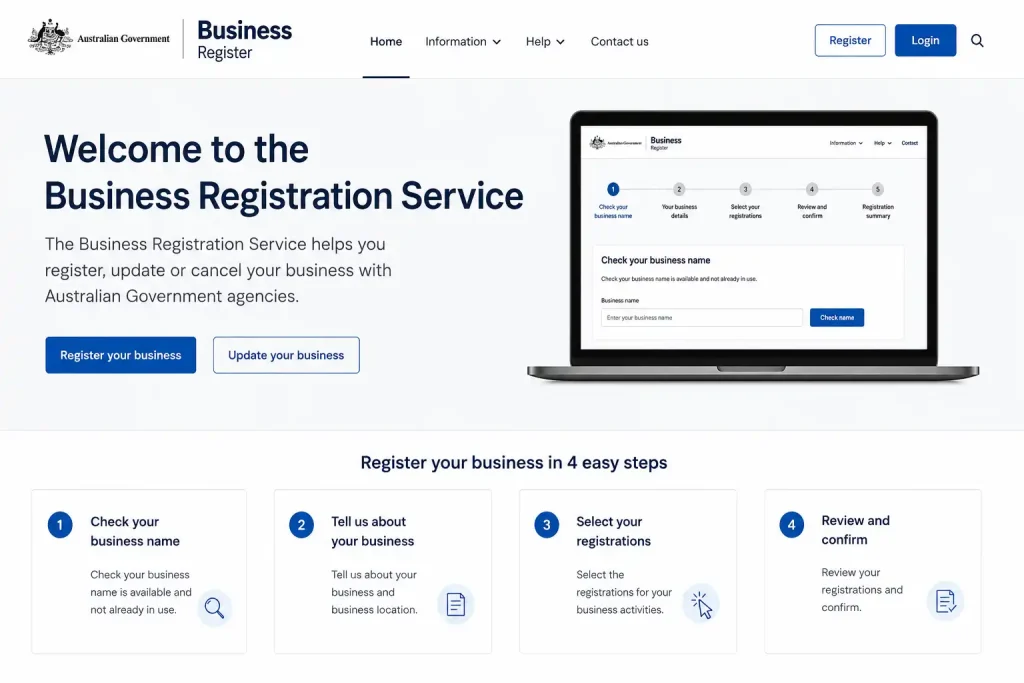
Start by accessing the Business Registration Service and choosing the registration option that matches your business needs.
2. Verify Your Identity
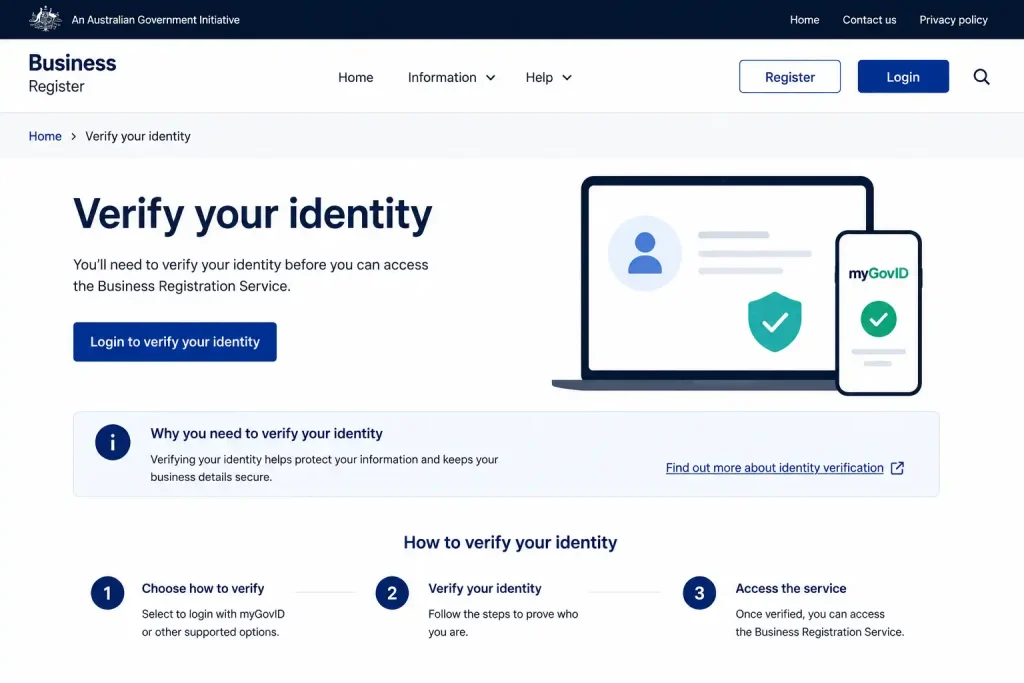
Complete the identity verification process by providing the required personal details and identification information.
3. Enter Your Business Details
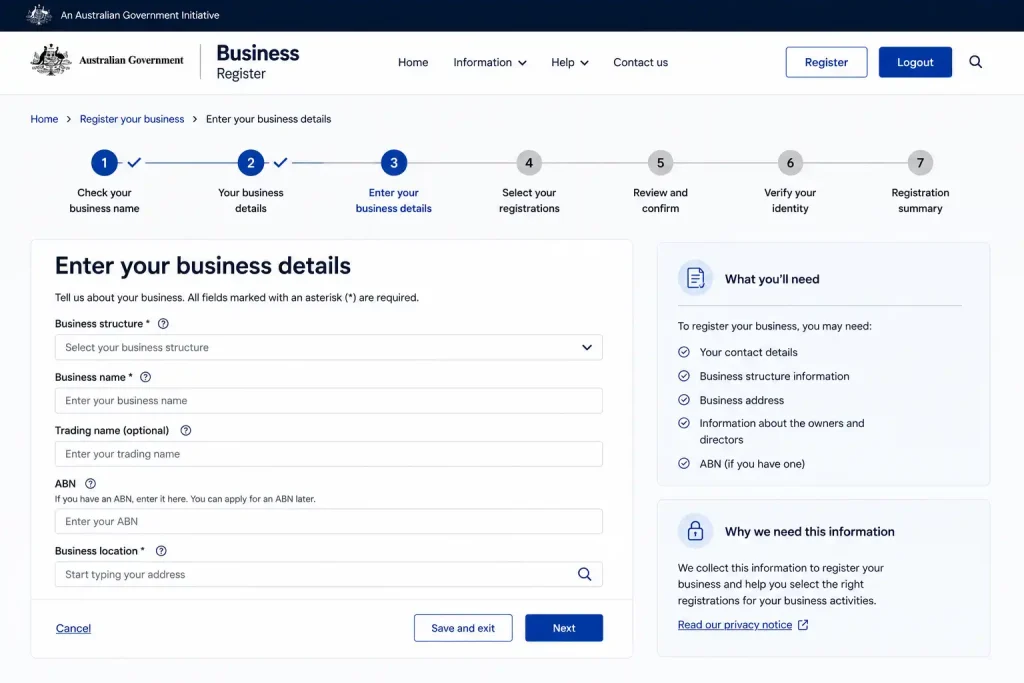
Provide relevant information about your business, including its structure, activities and contact details.
4. Select the Required Registrations
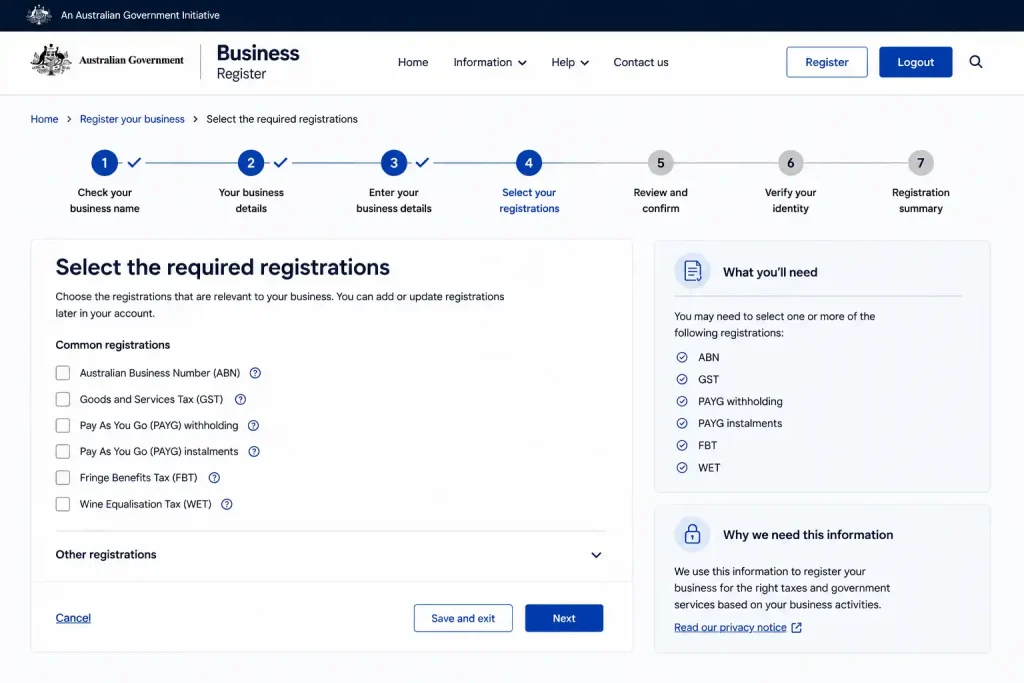
Choose the registrations applicable to your business, such as an Australian Business Number (ABN), business name, company registration or selected tax obligations.
5. Review and Submit
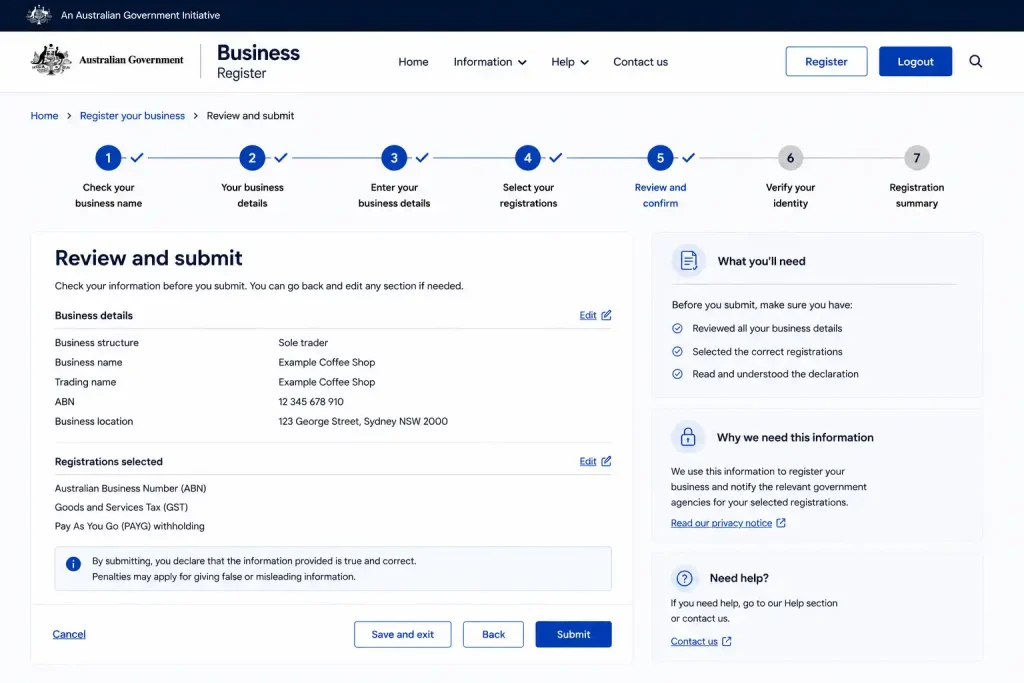
Review all details carefully, complete the required declarations and submit your registration application.
Saved and Unfinished Applications
Business registration isn’t always something you can finish in one sitting. If you need to collect additional information, the portal may allow an eligible draft application to be saved so you can return to it later.
To manage an application in progress:
- Sign in to the dashboard.
- Open the applications currently in progress.
- Select the relevant draft.
- Continue editing it or remove the draft if it is no longer required.
This is useful when you need additional business, tax or personal information before submitting the registration.
Application Notifications and Status Updates
After submitting an application, keep an eye on the notifications associated with your Business Portal account. Updates can provide important information about what happens next.
Notifications may relate to:
Checking these updates helps you respond promptly if the registration authority requires further information.
Choosing a Business Structure
Selecting the appropriate structure is an important part of establishing a business. The structure affects how the business is owned and operated, as well as how responsibilities are shared.
The source material identifies several structures that may be relevant, including sole traders, partnerships, trusts and companies.
Sole Trader
A sole trader structure is generally straightforward and is owned by one individual.
Typical characteristics include:
This structure can suit individuals who want to operate a business directly rather than creating a separate company structure.
Partnership
A partnership involves two or more people operating a business together.
Common characteristics include:
Getting an ABN for Your Australian Business
An Australian Business Number (ABN) is an 11-digit identifier used to identify a business when dealing with customers, suppliers, government bodies and tax systems. For many Australian businesses, obtaining an ABN is an important early step when establishing commercial operations.
The ABN can also be used when dealing with certain tax registrations and government business services. Before applying, make sure the information you provide accurately reflects how your business operates.
What Can an ABN Help You Do?
Having an ABN can be useful for several aspects of running a business, including:
Details to Have Ready
An ABN application may require information about both you and the business. Depending on your circumstances, this can include:
Providing consistent information throughout the application is important, particularly where personal, business and tax details overlap.
ABN Application Process
The registration process begins with identifying the structure under which the business will operate.
1. Select the Appropriate Business Structure
Common structures include:
The structure you select should reflect how the business is owned and operated.
2. Explain What the Business Does
You will need to describe the activities carried out by the business. For example, the business might provide consulting, construction, online retail, professional or hospitality services.
Give a clear and accurate description rather than using a vague activity that doesn’t properly represent the business. The information supplied can form part of the assessment of the application.
3. Review and Lodge the Application
Before submission, check all information carefully. Once you’re satisfied:
- Confirm the details provided.
- Lodge the application.
- Keep the application reference number.
- Check the dashboard for updates.
Some applications may be processed promptly, while others can require additional review.
Registering a Business Name
If you intend to trade under a name that differs from your personal or registered company name, a business name registration may be required. The registration gives customers a recognised name under which the business can operate.
For new businesses, selecting the name early is useful because it can influence branding, marketing and how customers identify the business.
Reasons to Register a Business Name
A suitable registered name can help you:
A business name registration should not be confused with trademark protection. Registering a business name does not automatically give you exclusive trademark rights over the name.
Check the Name Before Applying
Before submitting a registration, check whether your preferred name is available.
An application may encounter problems where a proposed name:
It is sensible to prepare a few alternative names before beginning the application. That way, you have other options if your first choice cannot be registered.
Business Name Registration Duration
The source material identifies two registration periods:
| Registration | Available period |
|---|---|
| Business name | 1 year |
| Business name | 3 years |
Choosing a longer period can reduce how often you need to arrange a renewal.
Setting Up a Company
A company structure is another option for people who want to operate their business through a separate legal entity. Company registration involves creating a formal corporate structure with its own records and identification details.
For businesses that are growing or require a different ownership arrangement, this structure may provide advantages such as:
Some businesses that begin as sole traders later consider moving to a company structure as their operations develop.
Details Needed for Company Registration
Company applications require accurate information about the people and addresses associated with the company. Information may include:
Take particular care when entering these details because company registrations form part of formal corporate records.
Understanding the ACN
Once a company is registered, it receives an Australian Company Number (ACN). This unique number identifies the company and is used in corporate and regulatory records.
The ACN is different from an ABN, so business owners should keep the two identifiers clearly distinguished.
Tax Registrations You May Need
Business registration and tax registration are closely connected, but not every business needs every tax registration. The requirements depend on factors such as turnover, employees, benefits provided and the nature of business activities.
The Business Portal can be used to handle several relevant tax registrations as part of the setup process.
GST Registration
Goods and Services Tax (GST) registration may become compulsory when a business reaches the applicable turnover threshold. Some businesses may also choose to register where registration is appropriate for their circumstances.
GST registration can involve obligations such as:
Businesses should determine whether GST registration is required rather than assuming that every new business must register immediately.
PAYG Withholding Registration
Businesses that employ staff may need to register for PAYG withholding. This system allows employers to withhold tax from payments such as employee wages and meet the associated reporting obligations.
PAYG withholding helps businesses manage employee tax responsibilities, so employers should consider the registration requirements before making relevant payments.
Fringe Benefits Tax
Fringe Benefits Tax (FBT) can apply when an employer provides certain benefits to employees in addition to their salary or wages.
Examples mentioned in the source material include:
Businesses providing these types of benefits should determine whether FBT registration and related obligations apply.
Fuel Tax Credits
Some businesses may be entitled to Fuel Tax Credits (FTC) when eligible fuel is used for qualifying business activities.
Industries that may be associated with fuel tax credit claims include:
Eligibility depends on how the fuel is used and the applicable requirements, so businesses should check their circumstances before registering.
Can Several Registrations Be Completed Together?
One of the practical advantages of the Business Portal is that several business and tax registrations can be handled within a connected application process.
Depending on eligibility and circumstances, a registration workflow may include:
Using a combined process can reduce repeated data entry and make the initial setup more organised.
Registration Errors That Can Cause Problems
Small mistakes in an application can lead to delays or requests for clarification. Reviewing the information before submission is therefore worth the extra few minutes.
Common issues include:
Business Portal Fees and Registration Costs
The Business Portal Australia brings several business and tax registration services together in one online process. While some registrations are free, others involve government fees.
| Registration Service | Cost |
|---|---|
| Australian Business Number (ABN) | Free |
| GST Registration | Free |
| PAYG Withholding | Free |
| Fuel Tax Credits Registration | Free |
| Business Name Registration | Government fee applies |
| Company Registration | Government fee applies |
Government charges can change, so check the current fee shown during the relevant application before making a payment.
Tracking Your Business Portal Application
After submitting a registration, you can check its progress through your Business Portal dashboard.
How to Check Your Application Status
- Sign in to your Business Portal account.
- Open the dashboard.
- Go to your submitted applications.
- Select the relevant application.
- Check its current status and any notifications.
If the government requests additional information, the dashboard is where you can usually find the relevant update. Keep your application or reference number for future enquiries.
Common Business Portal Problems
myID Verification Not Working
A myID verification problem can occur when the personal information entered during setup does not match the details on your identity documents.
Try the following:
If the problem continues, use the relevant official support service rather than creating duplicate registrations.
ABN Application Under Review
An ABN application may sometimes require additional assessment instead of being approved immediately.
Possible reasons include:
If your application is under review, check the Business Portal regularly for messages or requests for information. Avoid submitting another ABN application for the same business unless instructed to do so.
Business Name Not Available
A proposed business name may not be accepted if it is already registered or is too similar to an existing name.
Before applying:
Having alternative names ready can make the registration process easier if your preferred choice is unavailable.
Updating Business Information
After your initial registration is complete, some changes may need to be made through the government agency responsible for maintaining that particular business record rather than through the initial registration process.
Updates may include:
Keeping registered information current helps prevent problems with government communication and ongoing business obligations.
Business Portal Australia Summary
The Business Portal Australia provides a central online pathway for setting up key business registrations. Depending on your circumstances, you can use it to apply for an ABN, register a business name or company, and complete relevant tax registrations.
For a smoother application, make sure your personal and business information is accurate, complete the required identity verification, check applicable fees and monitor your dashboard after submission. This keeps the article focused on the actual Business Portal Australia process without adding unrelated generic business advice.
Business Portal FAQs
Final Thoughts
The Business Portal Australia provides a central online service for completing important business registrations. Depending on your business structure and requirements, you can use the portal to apply for an ABN, register a business name or company, and complete relevant tax registrations.
By preparing accurate business information, completing the required identity verification, and checking your application status through the dashboard, you can manage the registration process more efficiently. For anyone starting a business in Australia, understanding how the Business Portal works can make the registration process simpler and more organised.
READ MORE:
ImmiAccount Login Guide (2026): Complete Registration, Visa Application & Account Management Guide
myGov Australia (2026): Complete Guide to Login, Services & Account Access
Australian Passport Application Guide 2026: Complete Online Process, Eligibility, Fees & Tracking